76

Nowadays on Windows 7, if I have no mouse on my computer I just press Win Button+->+Enter: enter image description here

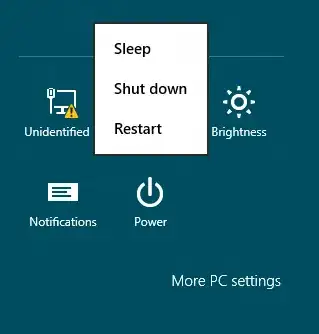
This makes my computer shutdown without needing to use a mouse. However, on Windows 8, I need the mouse to open that charms menu on the right side of the screen, open the "Settings" tab -> "Power" -> Then choose for "Shut down", "Sleep" or "Restart":

enter image description here

There is some keyboard shortcut to open these shutdown options on Windows 8 or another other way to do this without a mouse?

Journeyman Geek
  • 127,463
  • 52
  • 260
  • 430
Diogo
  • 30,192
  • 65
  • 150
  • 222
  • 6
    perhaps set your power settings to have the power button on your machine shutdown the computer when pressed? just a thought. – Andre Apr 03 '12 at 18:47
  • 3
    Not enough reputation to answer, but here it is. Shutdown: Win+X, U, U. Restart: Win+X, U, R. Modify the last letter, based on the displayed submenu, for other functions such as sleep. Simple. – Jordan Morris Jan 05 '14 at 01:06

11 Answers11

70

Press Win+D to show the Desktop, then press Alt+F4 to show the shutdown dialog, and finally, press Enter to shut down.

Indrek
  • 24,204
  • 14
  • 90
  • 93
Ry-
  • 2,134
  • 2
  • 16
  • 23
  • 1
    You can create a shortcut "C:\Windows\System32\shutdown.exe /s /t 0" – Brent Faust Dec 06 '12 at 05:06
  • 4
    Unreliable. If you have desktop applications open, you will end up closing them instead. Shutdown: Win+X, U, U. Restart: Win+X, U, R. Modify the last letter, based on the displayed submenu, for other functions such as sleep. – Jordan Morris Jan 05 '14 at 01:07
  • 1
    @Saber: This is to shut down from the desktop, not Modern UI. If you’re in a M. UI window, press Win+D twice. Apart from that, please go ahead and post that as your own answer. =) – Ry- Jan 05 '14 at 01:52
59

The easy, Win8-only way: Press Win+i, use the arrow keys to pick Power then enter.

The way that works even on NT 4: You can use the Win+R shortcut to open the "Run" dialogue. Windows has a builtin program, shutdown.exe, which can be used to shutdown (duh), logoff or reboot the computer. shutdown -r -t 0 will immediately start a reboot; shutdown -s -t 0 will immediately start a shutdown. See the output of shutdown /? to know the rest of the options.

ABC
  • 75
  • 1
  • 5
Jessidhia
  • 2,900
  • 19
  • 10
  • I wonder if press `Win` key then type the `shutdown` command directly still works? In Windows 7 it works. – Mengdi Gao Apr 03 '12 at 14:11
  • No need to use Win key, just start typing when in the metro Start interface, once you load the desktop all the Win key does is toggle between Desktop and Metro. – Moab Apr 04 '12 at 15:03
  • 3
    The metro interface however can't locate `shutdown` when you type it there (0 results for Apps, 2 for Settings (just normal `powercfg.cpl` things), 5 results for files (which is in source code I have locally)). You can, however, input `shutdown -r -t 0` in there and it'll work (tested with `shutdown -r -t 60` and `shutdown -a`). – Jessidhia Apr 04 '12 at 16:51
  • 21
    `Win` + `I` brings you directly to the settings bar. – Andrea Apr 05 '12 at 12:08
  • I use the `shutdown -s -f -t 0` technique everyday. Without it, every single XP instance I've owned would refuse to die. – Synesso May 01 '12 at 20:33
  • @Moab Besides, the suggestion to press Win and type shutdown doesn't work because of the change in search behavior. Not because they removed the start menu, which if they really did, it would fail at the very first step. Pressing the Win button would do something else completely than launch the start menu/screen. – Ben Richards May 01 '12 at 23:03
  • 3
    A quicker way is => windows key + D => alt F4 =>enter – user1308743 Aug 13 '12 at 16:41
  • 3
    This answer requires 14 keystrokes just to shut the computer down (11 if you use Win+I). In XP it was 3 keystrokes, in Win7 it was 3 or 4. Win+D, Alt+F4 is too awkward. Is there no easy way to shut down anymore? – Luke Nov 22 '12 at 21:38
  • @Luke: The best answer by far here is to remap the computer’s power button. :) – Ry- Apr 14 '13 at 14:41
18

Not exactly a shortcut, but a pretty fast way of doing this with only the keyboard would be to use Win+R, then either shutdown /s /t 0 to shutdown or shutdown /r /t 0 to reboot.

Marcks Thomas
  • 6,272
  • 2
  • 22
  • 37
18

Set your power settings to have the power button of your computer shut down your PC when pressed.

Tamara Wijsman
  • 57,083
  • 27
  • 185
  • 256
12

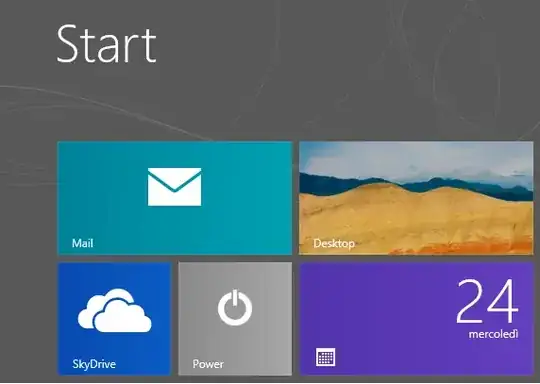
My variation is to create a Metro tile which shuts down the machine, the benefit is you can tab to your tile, then press enter.

Start on the Windows 8 desktop, or in a new folder - anywhere except in the Start Menu folder!

Right-click, New, Shortcut.  Paste the instruction:

C:\windows\system32\shutdown /s /t 20 (remember the space between t and 20)

Name the shortcut after yourself, e.g. Guy's Shutdown, that way you will recognise it easily!

Use Windows Explorer to navigate to the crucial folder:

C:\ProgramData\Microsoft\Windows\Start Menu\Programs

Paste your shortcut.  (In passing you can see it's not possible to create a new shortcut here)

It's reassuring to see your shortcut amongst the other Apps.

Return to the Metro UI start screen - Windows Key is the quickest way.

Tab, or use the arrow keys, to move to your shutdown tile, press enter.

ABC
  • 75
  • 1
  • 5
Guy Thomas
  • 3,288
  • 10
  • 35
  • 48
7

Shutdown: Win+X, U, U.

Restart: Win+X, U, R.

Credit: User saber, from his/her comment on the original question above.

Jon Schneider
  • 1,062
  • 3
  • 20
  • 35
6

Ctrl+Alt+Del, Alt+S
Or use Shift+Tab twice and Enter and then use the arrow keys and Enter to choose Shutdown.

Oliver Salzburg
  • 86,445
  • 63
  • 260
  • 306
Sensi
  • 69
  • 1
  • 1
5

Options by default

Using the Windows 8 settings bar

Press Win+I, use the arrow keys to pick Power then Enter. Choose Shutdown or Restart then Enter.

(8 steps: Win+I, End, Up, Right, Enter, Up, Up, Enter)

Using the shutdown dialog, and hiding all programs

Pressing Alt+F4 closes most Windows programs. If you hide all programs first with Win+D, and activate the Desktop, Alt+F4 brings up the close Windows dialog. If you are in the Metro interface part of Windows 8, you must press Win+D one more time.

(3 or 4 steps: Win+D[, Win+D], Alt+F4, Enter)

Using the Run dialog

Since Windows XP you can use the Win+R shortcut to open the "Run" dialogue. Windows has a builtin program, shutdown.exe, which can be used to shutdown, logoff or reboot the computer. shutdown -r -t 0 will immediately start a reboot; shutdown -s -t 0 will immediately start a shutdown. See the output of shutdown /? to know the rest of the options. Commands like shutdown.exe -s -t 0 can also be typed or pasted and then executed in the Start screen.

(2 steps if previously and last used command: Win+R, Enter)

Using the Lock screen

You can press Win+L to access the Lock screen. There you can press Shift+Tab to highlight the power button, press Enter and you can select shutdown or reboot with the arrow buttons and then press Enter. You must wait a little before pressing Tab.

(6 steps: Win+L, Shift+Tab, Enter, Up, Up, Enter)

ABC
  • 75
  • 1
  • 5
4

Follow the steps in one of my articles to create your own tile in Windows 8.

  1. Go to %Appdata%\Microsoft\Windows\Start Menu\Programs
  2. Right click > New > Shortcut
  3. Enter %windir%\system32\Shutdown.exe -s -t 0 as the location New Shortcut
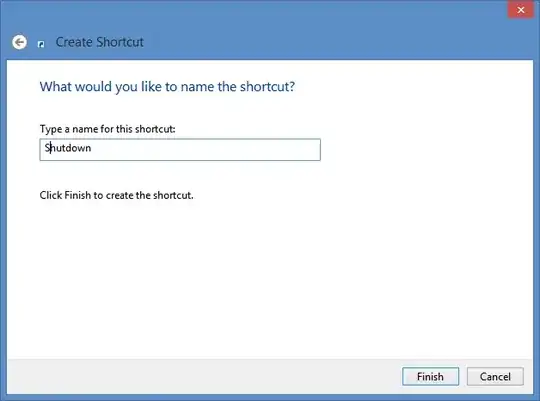
  4. Give it a name and click Finish Finish
  5. Position the icon where you want it:
    Shutdown Metro

Optional:

  1. Right click on the shortcut and select Properties
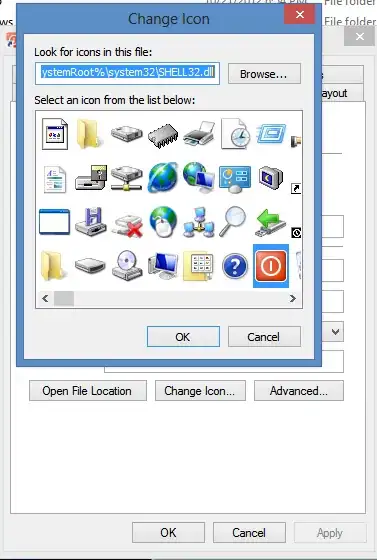
  2. Click the Change Icon... button. (There is a power button icon in %SystemRoot%\system32\SHELL32.dll Shutdown icon

To add the shortcut to the All Apps group:

  1. In the shortcut properties, go to the Security tab
  2. Add All Application Packages and make sure the Read and Read & execute permissions are enabled

For more information, see http://www.oostdam.info/index.php/sectie-blog/54-windows8/343-windows-8-create-a-shutdown-button

Louis Waweru
  • 23,945
  • 39
  • 132
  • 198
Ben Oostdam
  • 49
  • 1
  • 1
  • 7
    Welcome to Super User! Whilst this may theoretically answer the question, [it would be preferable](http://meta.stackexchange.com/q/8259) to include the essential parts of the answer here, and provide the link for reference. – Canadian Luke Sep 05 '12 at 17:48
4

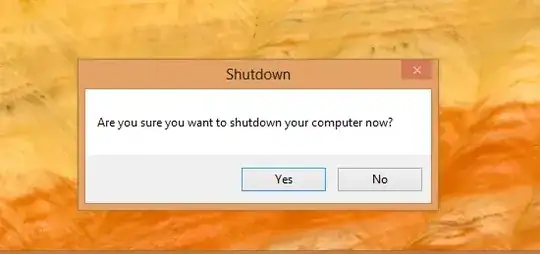
This is the source code:

namespace power
{
    static class Program
    {
        [STAThread]
        static void Main()
        {

            DialogResult dialogResult = MessageBox.Show("Are you sure you want to shutdown your computer now?", "Shutdown", MessageBoxButtons.YesNo);
            if (dialogResult == DialogResult.Yes)
            {
                Process.Start("shutdown.exe", "/s /t 0");
            }
        }
    }
}

It's a small program in C# that displays a dialog to confirm if you want to shutdown your PC. Simply pin it to Start!

Josh
  • 5,143
  • 5
  • 34
  • 44
  • You could do this really easily with VBScript: https://gist.github.com/3980564 And it'll still let you set a custom icon. – Ry- Oct 30 '12 at 14:38
3

Removed my consumer preview already so I can't check this.

On all other versions of Windows I just repeatedly press Alt+F4 until all windows are closed and the shutdown menu shows. Then I press Enter

Simon Verbeke
  • 3,713
  • 9
  • 42
  • 63