How do I add a tile on the Windows 8 Modern UI that allows me to click that tile to start shutting down the computer?
Asked
Active
Viewed 1,699 times
7


-
There are a couple of answers here: http://superuser.com/questions/408015/how-to-reboot-shutdown-windows-8-without-the-mouse – Louis Waweru Oct 28 '12 at 18:53
2 Answers
11
Adapted from Ben Oostdam's blog.
- Go to
%Appdata%\Microsoft\Windows\Start Menu\Programs - Right click > New > Shortcut
- Enter
%windir%\system32\Shutdown.exe -s -t 0as the location
- Give it a name and click Finish
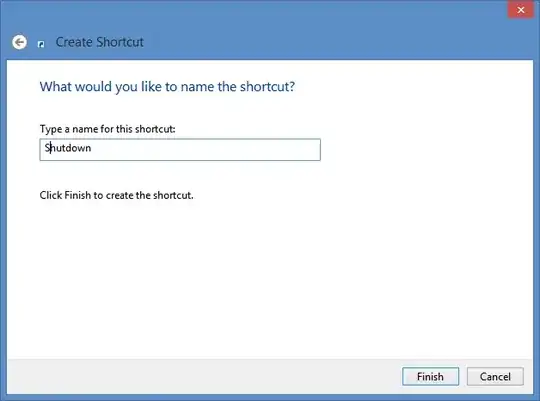
- Position the icon where you want it:
Optional:
- Right click on the shortcut and select Properties
- Click the Change Icon... button. (There is a power button icon in
%SystemRoot%\system32\SHELL32.dll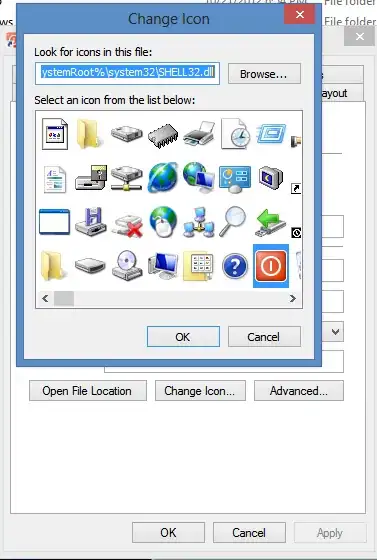
To add the shortcut to the All Apps group:
- In the shortcut properties, go to the Security tab
- Add
All Application Packagesand make sure the Read and Read & execute permissions are enabled

Louis Waweru
- 23,945
- 39
- 132
- 198
-
2@SeiSeiei Just a note "shutdown -s -t 0" will do a full shutdown, so next boot will be slower than if you used the "settings" shutdown, it does a "shutdown -h -t 0" for a hybrid shutdown, which allows for a faster startup. – Moab Oct 28 '12 at 20:38
1
Use Win+C and then select Shutdown.
-
1That pops up a sidebar, but there is no Shutdown option... unless you click Settings, then do additional clicks... – Sei Seiei Oct 28 '12 at 19:18