For shutting down Windows 8 I have to move them mouse to the right corner -> charms menu -> settings -> power -> shut down.
Is there a faster way?
For shutting down Windows 8 I have to move them mouse to the right corner -> charms menu -> settings -> power -> shut down.
Is there a faster way?
Keep tapping Alt+F4 (Quit Program).
For more windows shortcuts see: http://support.microsoft.com/kb/126449
The KB doesn't cover Windows 8 (yet), but it's a classic Windows hot-key (since at least Windows 95).
Also see: How to reboot/shutdown Windows 8 without the mouse?
Another possible option: create a batch file or a shortcut that contains shutdown -f -s -t 00 and put it on your desktop.
As Randolf West suggested: The power button on and ACPI enabled PC (generally all modern PCs) works well when configured to shutdown (instead of entering a sleep mode).
Another option: A power bar with a switch shuts off PCs FAST, but it's not a good idea. :)
Ctrl+Alt+Del and then select shutdown. Alt+F4 from desktop does the trick as well. Configuring power button is the best way though.

Here is a way to add a Shutdown button to your start screen. I found this information on this site. I am reposting it here for posterity sake and others who have this question. Note: This method does not Shutdown the computer using the Hybrid Boot Option in Windows 8.
Instructions:
shutdown /s /t 0 (that’s a zero) in the location box and hit Next. shutdown /r /t 0 in the location field. 
Just a little addition to existing answers. The quickest way to shut down Windows 8 for me takes these steps:
I hope it will help someone just as it is helping me.

In addition to the various other options already mentioned, it is still possible to use the WIN + R shortcut to bring up the run box, which will allow you to run the shutdown command and its various parameters directly.
How about:
;)
You could create an AutoHotKey script assigned to a global shortcut to do this for you!

HotShut is a free tiny app which lets shutdown as well as restart, lock, hibernate or log off from your Windows computer instantly from the "system tray" (notification area of the task bar)
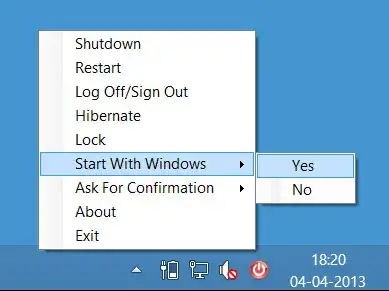
Simply right click and select your desired option.
More info & to download the zip file:
http://www.thewindowsclub.com/quickly-shutdown-restart-lock-logoff-windows-computer-hotshut


