17

When I try to open .chm help from a network shared drive I receive the following error:

Navigation to the webpage was canceled.

I know about the .reg solution described on KB896054

[HKEY_LOCAL_MACHINE\SOFTWARE\Microsoft\HTMLHelp\1.x\ItssRestrictions] 
"MaxAllowedZone"=dword:00000001 

but it does not work in Windows 7.

Any ideas how to make .chm help available from the network drives?

Edit: I have the network path mapped to P: drive letter. My program runs from P: and I want to see the help for it. Copying the program to local drive is not a solution for me.

Lukas Cenovsky
  • 1,429
  • 3
  • 13
  • 17

5 Answers5

6

I also experienced this problem, on Windows 7, 64-bit. I had to add the UNC path (\\drive\share) to my Trusted Sites zone and set (in HKLM\SOFTWARE\Microsoft\HTMLHelp\1.x\ItssRestrictions) MaxAllowedZone to 0x02, not 0x01. I hope that this helps someone else. Source: KB 896054, which has a handy table of which MaxAllowedZone settings enable which zones (higher numbers are more permissive). Another SuperUser question, number 69863, also tells how to turn off the "Open File Security Warning" nag message.

5

Following 2 keys must be entered and then you can view CHM files on Windows 7:

[HKEY_LOCAL_MACHINE\SOFTWARE\Microsoft\HTMLHelp\1.x\ItssRestrictions] 

"MaxAllowedZone"=dword:00000001

[HKEY_LOCAL_MACHINE\SOFTWARE\Microsoft\HTMLHelp\1.x\ItssRestrictions]

"UrlAllowList"=\\\\[server name]\\[share name]\\[path];file://\\\\[server name]\\[share name]\\[path];

Added by an anonymous user (name CB): Note that on a 64-bit Windows 7 you will need to include:

[HKEY_LOCAL_MACHINE\SOFTWARE\Wow6432Node\Microsoft\HTMLHelp]
[HKEY_LOCAL_MACHINE\SOFTWARE\Wow6432Node\Microsoft\HTMLHelp\1.x\ItssRestrictions]
"MaxAllowedZone"=dword:00000001
Tamara Wijsman
  • 57,083
  • 27
  • 185
  • 256
4

I have encountered the very same problem.

What you can try:

Retype the address

... until the cows come home :)

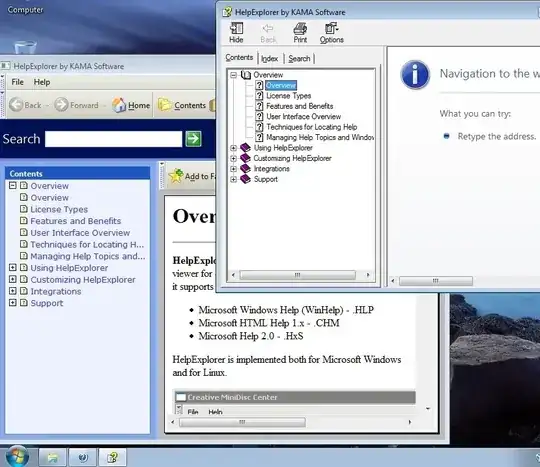
Or use Help Explorer by KAMA Software.

enter image description here

You don't even have to install the program, you can use it portable: just extract the two folders bin and gre and run the executable helpexplorer.exe.

Note: Help Explorer is shareware. However, there are no restrictions, none whatsoever, which is fine because KAMA Software seems to have disappeared from the face of the earth, so licensing the software is rather difficult. Any information about how to register the software is appreciated.

I found the program quite a while ago when I was looking for a decent help file viewer and I've been using it ever since. Many technical ebooks are released as CHM and Microsoft's own viewer is a royal pain in the behind, HE is just what a proper viewer should be like: with a modern interface, history lookup, favorites and easy font size adjustment (zoom in/out with CTRL +/-) without changing the internet font settings ... and of course it doesn't cancel the navigation on network shares. :)*

Gaff
  • 18,569
  • 15
  • 57
  • 68
3

Quickest way - but not convenient - drag to your machine and open there.

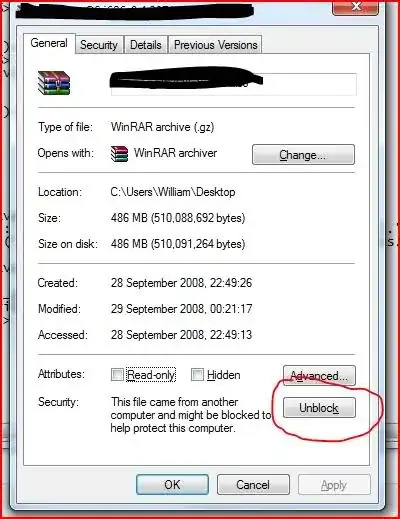
Technical way - Go to properties and see if you have an unblock button.

This is usually caused by a NTFS flag set from another machine.

I have no idea why other files work but for some reason, .CHM files are affected... I guess it is to do with the way it caches the HTML pages.

alt text

Gaff
  • 18,569
  • 15
  • 57
  • 68
William Hilsum
  • 116,650
  • 19
  • 182
  • 266
  • 1
    Copying to the machine is not the solution - my program is run from the network and the same way should be the help. I don't see any Unblock button when I view the .chm file properties. – Lukas Cenovsky Nov 26 '09 at 14:00
  • 1
    You may also want to go into Internet Options and add your P drive in to the safe/trusted zones and see if that makes a difference – William Hilsum Nov 26 '09 at 14:19
  • 1
    That was it! Adding the P drive manually to intranet sites has solved the problem. Of course you have to use the .req hack too. Accepting this solution. – Lukas Cenovsky Nov 27 '09 at 22:24
  • There is no "Unblock" button on my Windows 7. Registry must be edited (and then chm files show). – MKaama Jul 26 '16 at 16:35
2

I use the following in a .cmd script (right-click, run as administrator):

REG ADD HKLM\SOFTWARE\Microsoft\HTMLHelp\1.x\ItssRestrictions /v MaxAllowedZone /t REG_DWORD /d 1 /f
REG ADD HKLM\SOFTWARE\Microsoft\HTMLHelp\1.x\ItssRestrictions /v UrlAllowList /d "\\yourserver;file://\\yourserver;http://your.intranet.web" /f

(it's the same as shirley's answer, but double-clicking .reg files over the network does not work and I have my config scripts on the server. But running a .cmd script as admin works)

mivk
  • 3,441
  • 36
  • 33
  • not sure why, but on my win7 laptop the second command also entered the trailing `" /f"` into the UrlAllowList key. After manually removing the trailing characters from the key I could view the net drive .chm files. – matt wilkie Mar 11 '12 at 06:18
  • I had to resort to the excellent HHReg utility from http://superuser.com/questions/427191/chm-files-wont-open-in-a-certain-folder/519519#519519 to guess the correct string. It turned out to be "mappeddriveletter:\path;"; the suggested "\\youservername\path;" and "\\ip.add.re.ss\path;" did not work for me. – MKaama Jul 26 '16 at 16:41