11

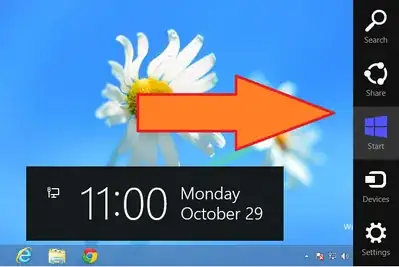
If you press Windows + C in Windows 8, you will get the new UI element called the Charms Bar. It contains some useful links for sharing and searching:
charms bar

If you want to customize it, searching on internet will probably lead you to a third-party application like this or this. However, it seems that they will only allow you to set a new skin for the bar's buttons.

Is it actually possible to add a new button or remove any existing button from the Windows 8 Charms Bar?

Vladimir Sinenko
  • 2,685
  • 6
  • 26
  • 33

2 Answers2

9

The charms bar was designed with only these in mind. There is no official way to add icons to the charms bar.

Caleb Jares
  • 2,649
  • 3
  • 19
  • 29
  • 3
    And with good reason. They're trying for consistency (for a change) across all editions of Windows 8. –  Oct 29 '12 at 17:37
  • 1
    They have been looking after such consistency by making their recent products less and less customizable (ribbons, charm bar, start menu, etc). This is why people should use Linux. – Hossein Mar 11 '13 at 19:26
1

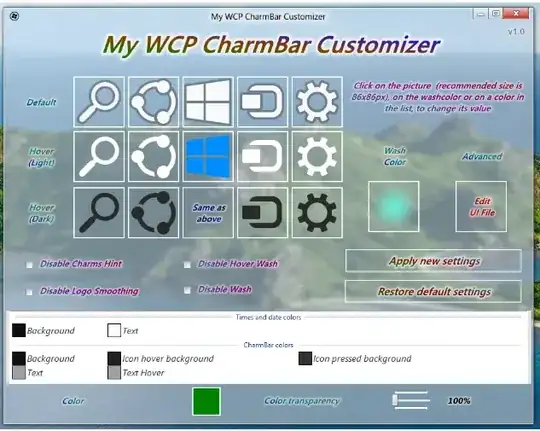
Whilst it is not possible to do exactly what you desire with the Windows 8 Charms Bar, there is a degree of manipulation that can be achieved with it.

My WCP CharmBar Customizer is a free portable application that will help customize many aspects of the Windows 8 Charms Bar.

enter image description here

If at any time, you decide that you don’t like the changes anymore, you can restore default settings with only one click.

Download:

http://www.softpedia.com/get/Desktop-Enhancements/Other-Desktop-Enhancements/My-WCP-CharmBar-Customizer.shtml

Simon
  • 4,437
  • 8
  • 39
  • 51