104

Possible Duplicate:
Using cd Command in Windows Command Line, Can't Navigate to D:\

I am unable to cd D:\ or cd D: or to any other drives. I am facing this problem from last 2 months but until now cmd was not that important to me.

I have checked multiple times with 2-3 anti-virus but it doesnt show any, and according to me there shouldnt be, because I visit only a few top sites, use genuine software and plug only my usb drive in PC.

This is what happens when I try to cd
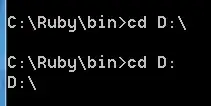
cmd screenshot

Shishant
  • 1,385
  • 3
  • 12
  • 16
  • 1
    While the question has been answered, a neat upshot of this is that different drives maintain different working directories - and you can refer to them by the drive letter! `copy aFile e:` will copy aFile to e:'s working directory, for example. – Phoshi Jun 26 '11 at 22:07
  • The irony, Phoshi, is that in Windows NT, including Windows NT version 6.1 as in the question, that is _not_ the case for the operating system proper. There's only _one_ current directory for a process. The old MS/PC/DR-DOS semantics of separately maintained working directories for each drive are emulated (but not exactly) via a system of hidden environment variables. – JdeBP Jun 27 '11 at 10:48
  • It is indeed true, that there are (even if emulated) multiple current directories. For further information read this nice article http://blogs.msdn.com/b/oldnewthing/archive/2010/10/11/10073890.aspx by Raymond Chen – HalloDu Jun 27 '11 at 13:28
  • It’s not surprising or ironic, it’s because Windows and DOS have completely different interfaces. Yes every process (even in DOS) gets a single item in response to a `GWD` command, but otherwise Windows and DOS function very differently. You can’t `printf` from a non-console Windows program either. `;-)` – Synetech Jun 28 '11 at 00:45
  • 1
    **`cd /d "D:\path"`** – T.Todua Jun 03 '20 at 10:59

2 Answers2

187

You do not need to cd d:\ just enter d:.

CD stands for change directory, which is not what you want to do.

Synetech
  • 68,243
  • 36
  • 223
  • 356
Greg
  • 4,262
  • 2
  • 20
  • 19
  • Thanks just realized I need to throw away ui for few days – Shishant Jun 26 '11 at 19:37
  • 3
    *> CD stands for change directory, which is not what you want to to.* Except that in Windows, the `CD` command *does* have an option to change drive. – Synetech Jun 26 '11 at 21:30
  • @Synetech, that feature is recent in the history of Dos and Windows. It isn't in any version of COMMAND.COM, for example. My shaky recollection is that it wasn't in the earliest CMD.EXE from NT 3.1 either, but I can't put my hands on documentation to prove that easily right now. – RBerteig Jun 26 '11 at 22:11
  • 3
    It’s not *that* recent; it’s in at least W2K. Regardless, the question is about Windows 7, so `command.com` is irrelevant and the `/d` switch is definitely there. – Synetech Jun 26 '11 at 22:16
  • @Berteig, `that feature is recent in the history of Dos and Windows. It isn't in any version of COMMAND.COM, for example`   Also, the OP wasn’t using DOS, the question is about Windows 7, so the history of `CD` was irrelevant here; that switch was available. – Synetech Nov 30 '13 at 16:06
66

Use one of the following:

C:\Ruby\bin> cd /d D:\
D:\>

or

C:\Ruby\bin> cd D:\
C:\Ruby\bin> D:
D:\>
Synetech
  • 68,243
  • 36
  • 223
  • 356
  • 6
    And, don't forget put `"` around path if there are spaces in it: `cd "D:\My Documents\My Music\A Band\An Album"` – LiuYan 刘研 Jun 26 '11 at 19:27
  • 2
    @Liu, you don't always need to bother, for example `cd /d C:\program files\Microsoft Office` works fine for me from `D:` on a Win XP `cmd` instance. It *is* however, a really good habit to get in to, otherwise one day you'll use another application that cannot handle paths given as arguments that aren't enclosed. – DMA57361 Jun 27 '11 at 10:23
  • That works because the `CD` command expects a single path argument (it does not take multiple directories). Therefore it interprets everything (other than the `/d` switch) as a single path, including spaces. That’s why if you use the auto-completion character (defaults to TAB) with `CD`, it *only* selects directories, while with other commands (eg `dir`, `copy`, etc.), it selects files and directories together. Like DMA57361 said, `CD` knows what it does and understands its arguments, so it handles them— or rather **it** —intelligently. (Were that *all* programs would do so. \*sigh\*) – Synetech Jun 28 '11 at 00:35
  • Ah, see Raymond says the same thing in the blog entry that HalloDu links to above. – Synetech Jun 28 '11 at 00:46
  • 1
    cd /d "D:\abc\your_directory" – Larry Lo Sep 19 '19 at 09:45
  • @RajuyourPepe, Yes. I agree. In fact, I agree so much, I agreed with you almost 8.5 years in advance, in anticipation of your comment. – Synetech Sep 20 '19 at 12:47
  • I have just done a scratch search for this and tried – Larry Lo Sep 20 '19 at 12:57
  • @Synetech a bit funny of course, but there is a slight ambiguity in answer, because OP asked for drive d, and flag used is also /d. Changing (or adding) example to something like "cd /d z:\path\to\dir\on\drive\z" would help some heisty folks. – user124 Aug 11 '22 at 19:00