5

Possible Duplicate:
How to mount NTFS drive at startup

I need to run .exe files on my Vista partition but I can't give them the right permissions so I need a way of auto mounting with the full permissions in order to run any files I need, otherwise I have to manually mount it each time I need it.

Zabadda
  • 260
  • 1
  • 3
  • 10
  • @kar: It would be except this is an extension of [this](http://askubuntu.com/questions/18052/exe-file-permission-fail/18053#18053) answer and the details are a bit different I think. – Nathan Osman Dec 18 '10 at 21:38

2 Answers2

6

In order to do this, you'll need to edit /etc/fstab.

  1. Make a backup of the file with the following command:

    sudo cp /etc/fstab /etc/fstab.old
    
  2. Now open the file with gedit:

    gksu gedit /etc/fstab
    
  3. At the bottom, add the following:

    /dev/sda1 /media/vista/ ntfs fmask=0022,dmask=0000,uid=1000,gid=1000 0 0
    
  4. Restart and make sure that it is now mounted when you log in.

Nathan Osman
  • 31,915
  • 40
  • 179
  • 259
4
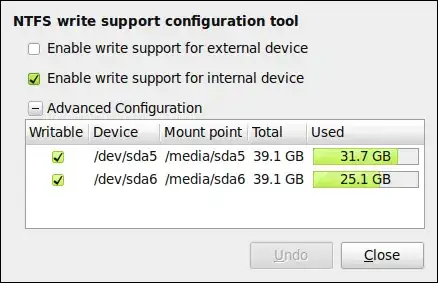
  • Install ntfs-config Install ntfs-config

  • After installation you can access it under System > Administration > NTFS Configuration Tool.

  • Select the appropriate drive you want to get mounted.

    alt text

Also see this post.

karthick87
  • 80,647
  • 59
  • 193
  • 232