Questions tagged [permissions]

Short for "file system permissions" - access control based on user, group, or global access.

In a Linux file system every file has some metadata attached to it that controls who is allowed to access it, and what they are allowed to do. Human users and system users are subject to these rules. Permissions are set separately for the owner and group owner of a file and for all others. The only user who can gain and grant permission to do anything to any file, regardless of ownership, is root. Normal users can access root's privilege using sudo.
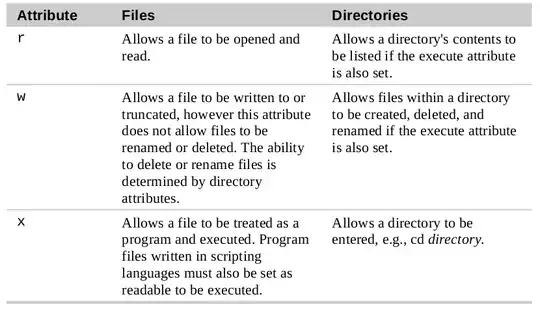
The read, write and execute attributes have different meanings for files and for directories:
There are also special permission bits. One is setuid, which allows the user executing a program to do so as the file's owner. The main use for this is the sudo program. Another is setgid, which causes the user's effective group ID to be that of the group that owns the file. The main use for this is creating directories that need to be shared by multiple users so that files created in them will be accessible to group members. Another is the "sticky bit", only applicable to directories, which restricts permission on renaming and deleting files inside them.

File permission settings are also called the file's mode and are modified by the chmod (change mode) command. chmod recognises symbolic notation, using the letters u (owner) g (group) o (others) and a all to + (add) or - remove permissions. chmod also recognises octal notation, for example 644 corresponds to -rw-r--r-- File ownership is changed using the chown command.

The default mode of files or directories created in a system is defined by the umask

In addition to the traditional permissions system, an extension to it that provides more fine-grained control is the ACL (access control list) system, which allows permissions to be specified for a single user.

7422 questions
749
votes
9 answers

Change folder permissions and ownership

I would like the user to have full rights on this folder (as well as all sub-directories and files in it): ~/.blabla currently owned by root. I have found numerous posts (in this forum and elsewhere) on how to do this for files but I can't find a…
user2413
  • 13,877
  • 17
  • 53
  • 87
506
votes
7 answers

How can I get octal file permissions from command line?

There is a chmod command to set file permissions, but can I get file permissions in octal mode (such as 755) from the command line?
Anwar
  • 75,875
  • 31
  • 191
  • 309
473
votes
8 answers

How do I change my username?

Some time ago, when I installed Ubuntu, I chose a rather stupid username for my account that I do not want to use anymore. How do I change this (including the name of my home directory, and the name in the terminal) without losing settings for…
Takkat
  • 140,996
  • 54
  • 308
  • 426
311
votes
5 answers

Give specific user permission to write to a folder using +w notation

I know I can assign the permission to write to an owner/group/others like this: chmod u+w myfolder Can I specify the specific user here? Some like this: chmod username u+w myfolder
Max Koretskyi
  • 3,509
  • 4
  • 16
  • 18
274
votes
11 answers

can't login as mysql user root from normal user account in ubuntu 16.04

I just installed Ubuntu 16.04 LTS along with the packages php, mariadb and nginx. I ran mysql_secure_installation and changed the root password. Now when I try to login to mysql using the root account while logged in Ubuntu as normal user account I…
codescope
  • 2,841
  • 3
  • 10
  • 9
272
votes
21 answers

SSH Permission denied (publickey)

I am trying to connect to a Linode (running Ubuntu 12.04 LTS) from my local machine (also running Ubuntu 12.04 LTS) I have created a private and public key on my local machine and copied my public key to my Linode's authorized_keys file. However,…
Pattle
  • 2,859
  • 3
  • 15
  • 7
264
votes
2 answers

How to extract a zip file to a specific folder?

I have a zip file that I need to extract into another folder. When I set up extraction to said folder it says "permission denied". I've read here how to log into a terminal as root and superuser but can't find anything to help me. I need to extract…
Tj Cooke
  • 2,649
  • 2
  • 11
  • 3
234
votes
6 answers

What is "umask" and how does it work?

I believe that umask is something that controls file permissions, but do not fully understand it. After running umask 0644 in a terminal, I cannot read the files I create with the command-line text editor nano. I noticed that the permissions of that…
Lekensteyn
  • 171,743
  • 65
  • 311
  • 401
228
votes
5 answers

Why doesn't `sudo cd /var/named` work?

I want to cd into /var/named but it gives me a permission denied error, and when I want to use sudo to do this I am not permitted. What is the technical reason for this, and is it possible to do this some other way?
Hojat Taheri
  • 5,309
  • 6
  • 21
  • 26
225
votes
5 answers

How to find owner and group of a directory?

How can I find out owner and group of a directory in Ubuntu?
Gaurav Agarwal
  • 11,315
  • 18
  • 50
  • 66
166
votes
5 answers

'chmod u+x' versus 'chmod +x'

What is the difference between chmod u+x and just chmod +x? I have seen a ton of tutorials that say to use u+x to make scripts executable. However, omitting the u doesn't seem to have any effect.
Nathan Schwermann
  • 2,167
  • 3
  • 16
  • 21
166
votes
8 answers

Whats the simplest way to edit and add files to "/var/www"?

Having installed the web server is there a simple way to set a user able to use the graphic interface to copy files and directories to the local web server /var/www I gave myself administrative privileges in Ubuntu but it still doesn't allow copies.
k_graham
  • 1,761
  • 3
  • 11
  • 3
163
votes
10 answers

How do I use 'chmod' on an NTFS (or FAT32) partition?

I have a script that I need to execute on an NTFS partition. The script's permission is set to 600. I attempted to modify the permissions by running chmod 755 script.sh, which doesn't report a failure or anything - but it also doesn't change the…
Nathan Osman
  • 31,915
  • 40
  • 179
  • 259
148
votes
7 answers

How to make read-only file system writable?

At some point, the filesystem on my digital audio player has become read-only. I cannot copy files into it or remove files on it. Are there some possible reasons for the player's file system to change permissions in this way? I tried using chmod: $…
Tim
  • 24,657
  • 62
  • 151
  • 245
142
votes
3 answers

What is the "t" letter in the output of "ls -ld /tmp"?

When running the command ls -ld /tmp, the output would be: drwxrwxrwt 30 root root 20480 Mar 11 14:17 /tmp So I have two main questions: What is the letter t after the permissions? As far as I know /tmp is used to create temporary files related…
user255675
1
2 3
99 100