2

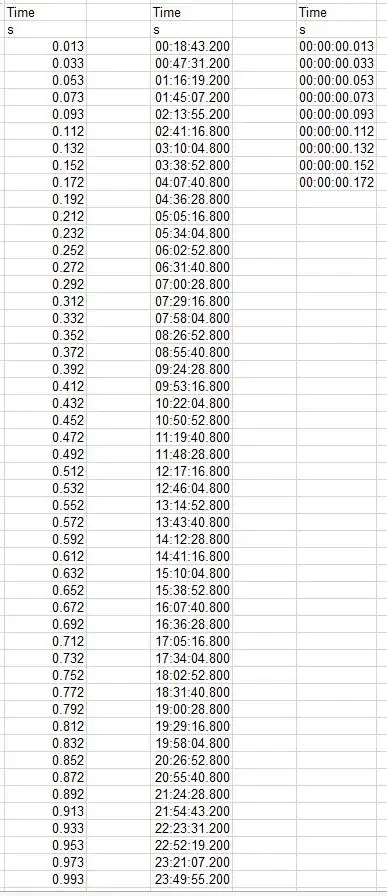
I am working with Excel 2013 and I have a column with time in seconds in the format 0.013, 0.033, etc. I would like to show this information in the the format 00:00:00.013, 00:00:00.033. But I am struggling and I don't get any result. When I set up the correct format, the software automatically changes the values. I have attached a picture which may help you to understand the problem.

How could I tell the software that the values are in seconds, not in hours?
Capture

Luis
  • 21
  • 1
  • 1
  • 2
  • The middle column is converting decimal fraction of a day (Excel's raw time storage), to hours, minutes, and seconds. You don't describe how you get that value. – fixer1234 Nov 03 '15 at 15:30
  • Luis: The conventional wisdom is that a picture is worth a thousand words.  The reality is that some pictures need a few words to support them.  It took me a couple of minutes to figure out that the first (displayed) column contains the data that you have, the third column is (I guess?) the result of displaying the first column with a time format, and the fifth column is what you want to have displayed.  It would have been nice if you had labeled them.  … (Cont’d) – Scott - Слава Україні Nov 03 '15 at 15:46
  • (Cont’d) … Even with this understanding, your picture doesn’t particularly illuminate your problem. And it would have been nice if, for completeness, you had shown the output you want for values ≥ 1, ≥ 60, ≥ 3600, ≥ 43200, ≥ 86400, etc. … … … … … … … … … P.S. You don’t need to post screenshots — in fact, it’s better if you don’t (especially if you don’t have that privilege yet). Just type in representations of your sheets, as was done [here](http://superuser.com/q/889201/150988) and [here](http://superuser.com/q/892744/150988). (You can even copy from Excel and paste into the question box.) – Scott - Слава Україні Nov 03 '15 at 15:47
  • Note: This is a drive-by question.  The OP created an account and simultaneously (?) asked this question, and then disappeared 31 minutes later. – Scott - Слава Україні Nov 11 '15 at 19:02

3 Answers3

3

As @fixer1234 commented, Excel stores dates and times as a number (possibly fractional) of days.  If you have data that are numbers of seconds, you must divide by 86400 (the number of seconds per day, =24×60×60).  Two ways to display the result you want are

  • Set B1 to =A1/86400 and format it as [hh]:mm:ss.000, or
  • Set B1 to =TEXT(A1/86400, "[hh]:mm:ss.000").
0

The 0.013 is 13 seconds? If so why do you want it as 00:00:0.013 and not 00:00:0.013?

Once you have that decimal number I don't think there is a way to 'format' it as time. However you could use a formula to convert it to a time value.

Use: =REPLACE(SUBSTITUTE(A1,".",""),3,0,":")

Yisroel Tech
  • 9,687
  • 3
  • 23
  • 37
-1

A cell with text format can be used to include milliseconds in a time entry. Set the entry cell to text format. Enter digits as mm:ss.000 The text entry is treated as a time and can be correctly converted to seconds using for example = (cell ref) /86400 Excel recognizes the text string in the cell as a time. The Problem (excel 2003). The entry cell format can be set to time and mm:ss.000 and a value entered in this format. Any edit of the entry causes Excel to round it to mm:ss only. The millisecond information is lost

Wizzer
  • 1
  • 1
    Your answer could be improved with additional supporting information. Please [edit] to add further details, such as citations or documentation, so that others can confirm that your answer is correct. You can find more information on how to write good answers [in the help center](/help/how-to-answer). – Community Apr 30 '22 at 16:47