1

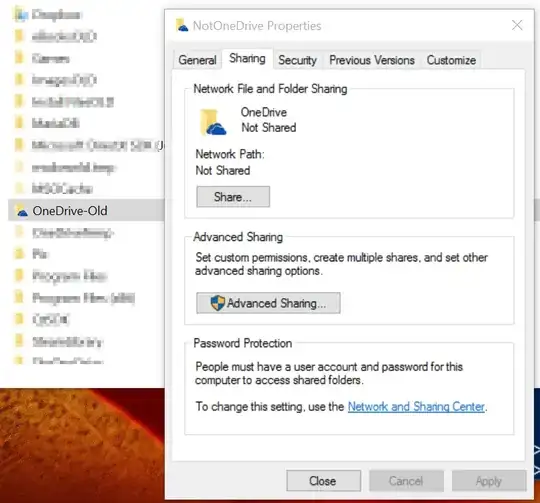
I've got this old OneDrive folder which I've renamed in Explorer to "OneDrive-Old". However, it keeps colliding when I try to create a new folder called "OneDrive". Turns out, it's name is actually still "OneDrive" as can be seen on this "Sharing" tab.

How do I fix this? How can I prevent Explorer from showing me these fake directory names ever again?

mpen
  • 11,884
  • 16
  • 55
  • 68
  • The obvious answer would be to rename it back to OneDrive. But I assume you are doing this for a reason, so can you edit your post and tell us what you want to achieve? – LPChip Sep 10 '15 at 10:21
  • Does that really matter? I want to keep the old folder until I've looked through it. I want to place my new OneDrive folder in the same spot. I suppose I could just move the files out and delete the folder, but I'd like to get to the root of this issue. – mpen Sep 10 '15 at 15:16
  • Yes, it does matter because this is not just a folder. Its part of a program. So moving the files out is probably the best thing you can do. – LPChip Sep 10 '15 at 17:15
  • @LPChip It shouldn't even be 'registered' as anything though. That's from an old install of Windows. I've reformatted several times since then. I don't think OneNote even knows about it, but evidentially Windows has encoded something "special" about it. I want to know what that "special" thing is so that I can murder it if this comes up again. – mpen Sep 10 '15 at 18:21
  • OneDrive is part of windows 8 and 10, so its installed by default, and uses that specific location. It has various registry keys all over the place so even though it is an old installation, it got reused. – LPChip Sep 10 '15 at 19:57
  • See also: http://superuser.com/questions/952837/how-do-i-remove-the-onedrive-folder-from-file-explorer-folder-tree-in-windows-10/952846#952846 – LPChip Sep 10 '15 at 20:00
  • @LPChip I should note this is `M:\OneDrive`. Quite different from `C:\Users\Mark\OneDrive`. I think at some point I had it set up that way, years ago, but it's somehow remembered that all this time. – mpen Sep 10 '15 at 20:31
  • 1
    Possible duplicate of [Folders renamed through Windows Explorer keep the original name](http://superuser.com/questions/1148080/folders-renamed-through-windows-explorer-keep-the-original-name) – Ferrybig Nov 22 '16 at 11:56

0 Answers0