38

I have a brand new 32GB flash drive that was bought from Hong Kong but manufactured in China.

When I plug it in, it's detected, and when I examine the properties of the drive the size is reported to be 31.2 GB. Windows forces me to format it but I have not manged to actually do that.

I then I browsed the internet and a forum told me to change the letter to L. After I did that I searched many programs that can help me format it, but when I checked it back, it is 4MB now.

Any idea what's happening with my drive?

Windows Disk Management screenshot

Chenmunka
  • 3,228
  • 13
  • 29
  • 38
Vieri_Wijaya
  • 491
  • 1
  • 4
  • 5
  • 18
    How much did you pay for it? If you paid a fraction of something sold locally, you probably got a "fake" drive. If it's too good to be true... Look at the reviews on [this drive](http://smile.amazon.com/HOPE-S-Brand-Stainless-Steel-Flash/dp/B00LUMFSB8/ref=sr_1_22?s=pc&ie=UTF8&qid=1436308748&sr=1-22&keywords=64gb+flash+drive&refinements=p_n_size_browse-bin%3A10285016011). Reviews peg it as an 8gb that says its 32/64/128... $18 128gb when other 128gb's are going for ~$30. – WernerCD Jul 07 '15 at 22:44
  • 2
    some counterfeit haves very high end packets, it's a common mistake, nothing to be shy – Francisco Tapia Jul 08 '15 at 00:24
  • I'm pretty sure this is a duplicate... – user541686 Jul 08 '15 at 04:41
  • 1
    @Mehrdad - If you can find the duplicate, I will issue a vote, but I have not been able to find it. Even if there is a similar question, this particular question, is good enough to stand-by itself. – Ramhound Jul 09 '15 at 15:28
  • An [interesting tutorial with another testing tool](http://www.rmprepusb.com/tutorials/-fake-usb-flash-memory-drives). – gaborous Aug 11 '15 at 10:25
  • Related: [How do I fix my USB drive to get its original 8 GB size back?](//superuser.com/q/382242/354511), [16 GB USB flash drive capacity down to 938 MB](//superuser.com/q/752874/354511), [USB drive not showing full size](//superuser.com/q/88509/354511), [16 GB USB flash drive shows as 16 MB and is unusable](/q/50207/354511), [1 GB space left, even after formatting a 16 GB flash drive?](/q/339489/354511), [16 GB USB flash drive turned to 1 GB after writing an ISO image onto it](/q/759602/354511) and [Toshiba pendrive shows 4MB instead of 8GB; what could have happened to it?](/q/927680/354511) – G-Man Says 'Reinstate Monica' Jun 02 '17 at 18:59

3 Answers3

71

It's a Counterfeit/Fake Memory Drive:

Quote from eBay from a paper trying to make people aware of the issue:

Fake memory drives have cracked hardware that will display fake/oversize capacity when you connect it to your computer. It may appear you can load this capacity on the drive, but as soon as you go over its real capacity the files will become corrupted and read strange file names. Fake drives usually are stated as having samsung memory. Please check ALL negative feedback of sellers and if people report counterfeit/fake usb drives then don't buy from seller!

http://www.ebay.com.au/gds/Fake-USB-DRIVES-From-China-HK-/10000000007355216/g.html

I suggest that you start by checking your drive with this tool:

Fake Flash Test

Here is a little documentation from the developer from his blog.

fixer1234
  • 27,064
  • 61
  • 75
  • 116
Francisco Tapia
  • 2,614
  • 4
  • 24
  • 43
14

It might not be counterfeit, but have a messed up partition table. Doing this could help even if it is counterfeit, as even counterfeits are usually larger than 4MB. I recently had this happen with an 8GB flash drive of mine that I had configured as a boot disk and was showing up as 2-8MB (I forget precisely how many).

You need a partition manager that can rewrite the whole partition table. The Windows disk manager couldn't cut it. I used Mini-Tool's free version: http://www.partitionwizard.com/free-partition-manager.html

If you do get it to show up as 32GB again, try putting some large files on it (pretty much fill it up) then copy them back and verify their integrity.

QuantumRipple
  • 265
  • 1
  • 5
  • 4
    A messed up partition table wouldn't affect the display in Disk Management. The empty space that is not allocated would appear on that screenshot unallocated to the right of the RAW partition. He almost certainly has a counterfeit with 4MB. – Shiv Jul 09 '15 at 07:17
  • 1
    What @Shiv said, a partition table contains no reference or value stating the size of the disk so a messed up partition table cannot change the size of a disk. If it were a partition table issue, you *can* fix it easily with Windows disk manager, simply issuing the `clean` command makes Windows completely clear any and all partition tables. – qasdfdsaq Jul 09 '15 at 10:27
5

To deal with the above problem the solution can be breifed as follows :

Step 1 : Identify The Real Size Of Your flash disk :

first thing you need to identify it’s speed class, it is to verify if you can write files to the advertised capacity for your flash disk.

In order to test it you could use H2testw 1.4

Step 2 : Identifying Software To Repair Your The Real Size Of Your flash disk

You could try on chipgenius which claims that it repairs and inspects if the usb flash controller chip has the wrong VID PID information

Step 3 : Repairing Your Fake Flash disk

If the flash disk was real and not fake You could try on the following to repair the stuff :

Operating System Disk :

It involves removing the existing hard disk from a computer or laptop, booting from the operating system disk, then reformatting the memory card. It appears to be very successful. You can’t use an OEM disk provided with your computer or laptop, it must be a full Windows operating system CD or DVD.

Primary Partitioning For The Reported Flash disk :

The alternative option is to use the information provided by H2testw to build a fence. That is, create a primary partition on the flash disk slightly less then the real capacity reported by H2testw . The balance of the capacity the windows operating system sees as unallocated. You must always remember never to touch or format the additional unallocated capacity, because it is the capacity that is fake, it does not really exist! If people own Acronis Disk Director software, they will use it instead.

Other options to check were you could use testdrive from instructables
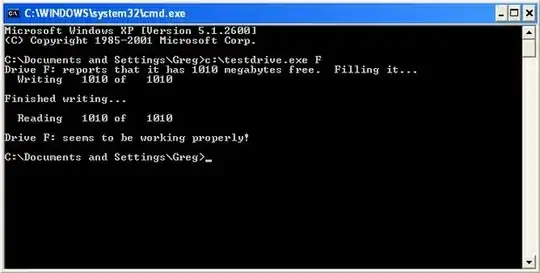
Sample test picture

Hope it helps

BlueBerry - Vignesh4303
  • 8,129
  • 22
  • 68
  • 99