7

I have been using Firebug and cURL for quite a while.

Firebug is amazing to capture HTTPS POST request as opposed to a network analyser as it is aware of SSL/TLS negotiation. And cURL is amazing to resend that POST request after modifying parameters.

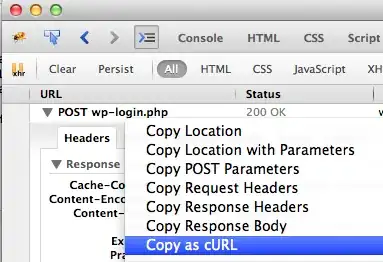
When I use firebug, I "Copy as cURL" a (HTTPS) POST request, and replay it from a Terminal. enter image description here
However when I replay this in Terminal, the response that I can see is encrypted. enter image description here
Questions:

  • Can I decrypt that Terminal output ?
  • Can I inject that cURL POST in the browser (firefox) to see the WebServer response decrypted ?

Thank you

2 Answers2

15

It's not encrypted, it's compressed. In your request, you send "Accept-Encoding: gzip, deflate" so the server is compressing the response for optimization.

You need to remove the -H "Accept-Encoding: gzip, deflate" and you should see the normal response.

OR

You can install gunzip if not already installed and pipe your curl command as curl [...] | gunzip -.

bad_coder
  • 643
  • 1
  • 7
  • 16
r00t
  • 251
  • 1
  • 3
  • To add a little extra context: cURL could not successfully complete the connection over HTTPS if it was not already natively handling the SSL/TLS encryption. The fact that you're getting data at all means that the encryption has been successfully negotiated. I don't, offhand, know if there's a way to have cURL natively handle the compression, I imagine so, but r00t's suggestion is sufficient and probably preferred. – Jason Jun 29 '15 at 18:25
0

If you want to download a file to disk rather than piping it into Terminal, just add -o filename.zip The -o flag says you're specifying a destination file name.