4

I'm trying to export my XLSX file to CSV using Excel 2013.
The problem I am facing is that the resulting CSV file uses semicolon (;) as a separator. I need it to be a comma (,).
I've changed my regional settings to use comma as a list separator:
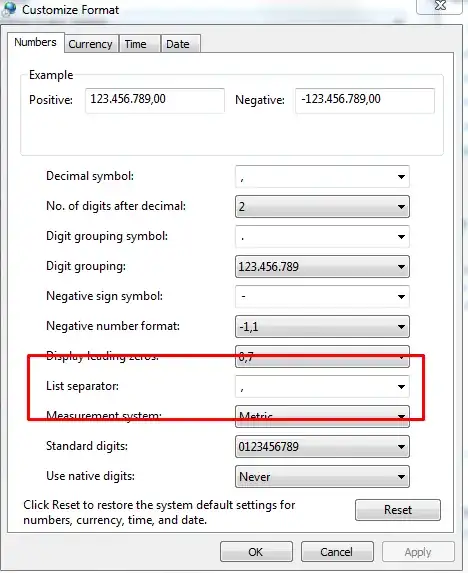
enter image description here

However, Excel still exports with semicolon. How to make it export csv with comma as a separator?

srgb
  • 784
  • 6
  • 15
  • 25
  • Try changing the Decimal symbol from `,` to `.` as well. – DavidPostill Jun 15 '15 at 16:50
  • ... and then the thousands grouping from `.` to " " (space). *Yes, it is as horrible as this* - I'm not sure this helps though. It might be easier to load the file into wordpad or notepad and replace `;` to `,` . – Hannu Jun 15 '15 at 19:45
  • there's always an option to do post-processing.. but being that I'm often in the need to export csv, it would be useful to know how to do this in Excel directly – srgb Jun 16 '15 at 11:33
  • https://superuser.com/questions/606272/how-to-get-excel-to-interpret-the-comma-as-a-default-delimiter-in-csv-files – Sam B Jul 21 '18 at 11:59

1 Answers1

3

As you've spotted, the list separator isn't for CSV.

I guess this is because you are using comma as the decimal so the default for "comma" separated files becomes semi-colon separated.

I think the only native solution is to change back to standard english settings before saving the file.

Or, as mentioned above, use a utility to change the ; to , post save. You could even get clever and intercept the save process in VBA (or simply create your own save button) to output the csv and then call out to the filing system libraries to do a replace text on the file.

Julian Knight
  • 14,313
  • 3
  • 27
  • 41