0

I need help with a 500GB WDC WD50 00AVDS-63U7B1 hard drive that has a cyclic redundancy check, refuses to initialize and has 100% health according to Hard Disk Sentinel. I've been trying to fix it several months ago and tried again today, without any progress, and it's starting to get desperately frustrating.

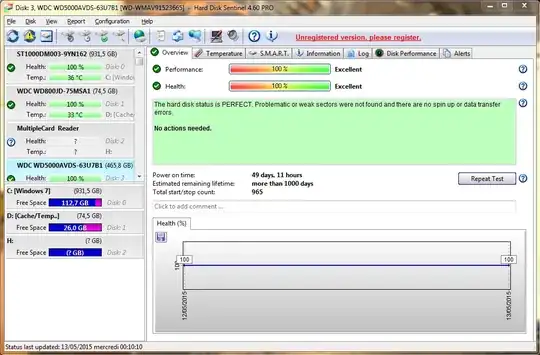
My problem is as follows : - I put the drive on a SATA USB adapter that I can guarantee works perfectly well (Have been using it for 2 years for my personal external drive and still do today) using the same wires I use for my other drive - I flicked the switch and the drive installed on my machine - Not seeing it in the drive list, I went to Disk Management, which told me to mount the drive manually. After doing so, I was given the cyclic redundacy check error and no further action could be taken. - I then went to Hard Disk Sentinel to check if the drive was dead, but the health is at 100%, no error logs, S.M.A.R.T. is perfect and it shows all the relevant info like it should.

I have already tried everything I've found on the internet and did some of my own digging. I am out of ideas, so I figured you guys could maybe help me out.

Disk Manager report :
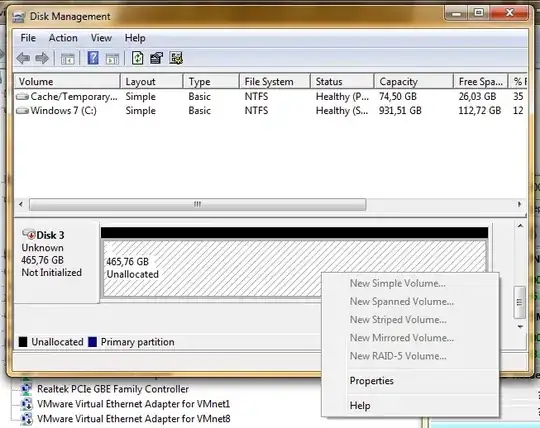
1

Sentinel report :
2

EDIT : Thank you all for your useful feedback. After connecting the drive directly by SATA, the cyclic redudancy error went away. However, I was still unable to initialize the disk due to an I/O error. I then decided to scan the drive using WDDLG, as Techpumpkin_WD suggested. However, it didn't seem to report anything different from Hard Drive Sentinel, and all the actions I've tried either failed (Writing zeros) or went on forever without the disk being accessed (Tests) Any suggestions?

Haniasita
  • 61
  • 10
  • Any chance you can try a different adapter and cable? What happens if you connect it directly in a desktop? – Karan May 12 '15 at 22:21
  • 2
    A *"cyclic redundacy check error"* sounds more like a SATA error message than a HDD error, since the HDD uses ECC. SATA (or ATAPI) CRC errors are often caused by a poor/bad connection (e.g. bad cable). – sawdust May 12 '15 at 22:31
  • See http://superuser.com/questions/641219/possibly-a-dying-hard-drive-but-reads-writes-work-unsure-about-log-entries/642771#642771 – sawdust May 12 '15 at 22:45
  • 1
    Power. Are you getting enough power to the drive? Let's say you have the thing connected to a USB hub, and let's say you added a USB camera and mouse to the hub. There's a possibility you no longer have enough power to the SATA=USB controller to properly drive the drive. I'm speaking from experience, though my symptoms were not so subtle. Doesn't matter if it works for other drives. Not all drives require same power input. – Otheus May 12 '15 at 23:23
  • Have you tried performing chkdsk operation the problem disk and see if they may help you out in fixing the same. – nathandgeek May 13 '15 at 03:29
  • 1
    I would not recommend chkdsk via USB connections. Can affect the HDD. Try connecting it directly to a SATA port, it should work fine and you'll know for certain that the problem is from the adapter. – Overmind May 13 '15 at 05:41
  • I would test this HDD connected via SATA directly. It could be the SATA to USB bridge, it could be lack of sufficient power or it could be a failing HDD. You can also try scanning the HDD with WD DLG http://products.wdc.com/support/kb.ashx?id=cYkTOl . Different drives can report some of the SMART attributes in a different way and there are also some attributes that are specific for the manufacturer. – Techpumpkin_WD May 13 '15 at 14:42

0 Answers0