-1

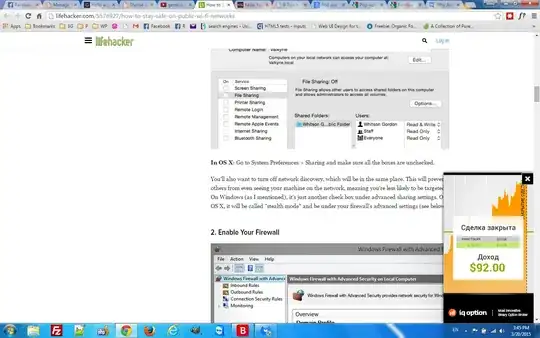
Yesterday my brother's computer was showing ads on almost every site, the same ads in the bottom right corner with a black close button. Today, my computer started showing them. I use the same network with him but as a public network to minimize the risk of network infection. The problem is that I NEVER install software from suspicious sources. Does anyone know something about this virus? I have some screenshots for some legit sites with those ads. So my computer is infected, no suspisous Chrome extensions or addons. Any suggestions? Thanks.

enter image description here

enter image description here

enter image description here

mohamed87
  • 241
  • 2
  • 13

1 Answers1

1

AdwCleaner may help you from this mess please download it and scan your pc from here: https://toolslib.net/downloads/viewdownload/1-adwcleaner/

  • It gave me 2 Files: C:\users\ROOT\AppData\Local\Google\Chrome\User Data\Default\Local Storage\https_static.olark.com_0.localstorage-journal AND C:\users\ROOT\AppData\Local\Google\Chrome\User Data\Default\Local Storage\https_static.olark.com_0.localstorage – mohamed87 Mar 20 '15 at 15:56
  • It gave me also a Registry Key: HKLM\SOFTWARE\Microsoft\Windows\CurrentVersion\Uninstall\{90120000-00B2-0409-0000-0000000FF1CE} – mohamed87 Mar 20 '15 at 16:00
  • What shall I do? delete them or not? – mohamed87 Mar 20 '15 at 16:12
  • 1
    The article http://www.howtogeek.com/209654/scammers-are-using-a-fake-version-of-adwcleaner-to-trick-people/ provides a different link to download AdwCleaner from, but also recommends MalwareBytes. – Jason Aller Mar 20 '15 at 16:47
  • But what about the 2 files and the reg key that it found? Do I have to delete them or is it a false positive – mohamed87 Mar 20 '15 at 17:03
  • delete it. those are infected object. – Md. Ahsan Habib Sep 21 '19 at 21:33