14

My control key on the right doesn't work how it should. E.g. Right ctrl + T won't open new tabs in firefox, right ctrl + w won't switch windows in vim, etc.

I know the key isn't physically broken, because xev shows that the right ctrl key generates events, but it just isn't responding as I expect it to in applications.
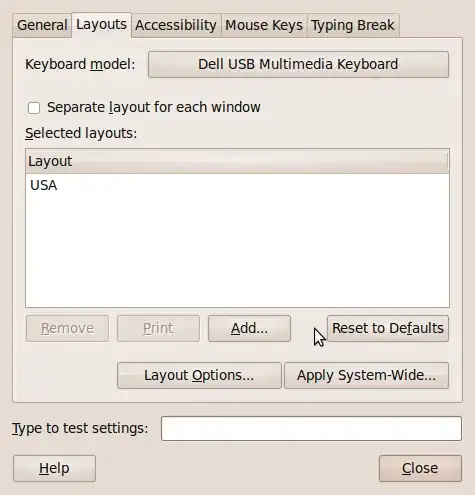
enter image description here

I tried Kim's answer but it still doesn't work.

blaine@blaine-laptop ~ $ xmodmap -pke | grep 105
keycode 105 = Control_R Control_R Control_R Control_R Control_R

Tried to map as Control_L as well, didn't work.


The computer is a laptop, I am unable to plug the keyboard in to another computer.

Gaff
  • 18,569
  • 15
  • 57
  • 68
Blaine Lafreniere
  • 313
  • 1
  • 4
  • 12

9 Answers9

14

I have the same problem in gnome while running VMWare & I fix it by running the following:

setxkbmap
Stephen Burke
  • 161
  • 1
  • 4
  • I don't know what this command does but it worked for me! Installing VMWare does somthing to your keymap. However I have to do this everytime I switch back from VMWare :( – Autodidact May 19 '15 at 10:54
  • Worked for me too. If your Ctrl key stops registering while or after using VMware Player, you need to run `setxkbmap` without any parameters. – RAKK Jul 25 '16 at 14:46
8

Use

 xev | grep -i keyrelease -A5

and press right ctrl to find its key code. Let's say it is 105, as on my keyboard. Then see what

xmodmap -pke | grep 105

tells us. It should be something like that:

keycode 105 = Control_R NoSymbol Control_R NoSymbol Control_R

If it isn't, you can change it with:

xmodmap -e 'keycode 105 = Control_R NoSymbol Control_R NoSymbol Control_R'

See whether it works now. If so, put this line into a script and add the script to your startup applications.

Kim
  • 2,338
  • 2
  • 16
  • 26
  • 1
    I've tried that, but it's still not responding as it should. Ctrl+T yields nothing in firefox, and ctrl+shift+T yields nothing in terminal. xmodmap -pke | grep 105 does show that it's mapped to Control_R, though, but it's just not behaving as I thought it would. Is there some kind of re-initializing I need to do? e.g. new fonts require fc-cache -f -v in order to be recognized. – Blaine Lafreniere Dec 30 '09 at 11:30
  • Are you just having trouble with certain key combos and the key works fine otherwise? Or doesn't it work at all? If the former, it might be that you have compiz keyboard shortcuts configured for Control_R T and Conntrol_R Shift T and compiz takes precedence over firefox and gnome-terminal. – Kim Dec 31 '09 at 07:12
  • It doesn't appear to work at all except in xev. No key combination that requires ctrl will work with right ctrl, but all key combinations that require ctrl will work with left ctrl. – Blaine Lafreniere Jan 01 '10 at 07:55
  • I've tried turning advanced effects to none in compiz manager, same problem. – Blaine Lafreniere Jan 01 '10 at 08:24
  • As a last resort I'd try setting it to Control_L instead. – Kim Jan 01 '10 at 09:30
  • Still not working ): – Blaine Lafreniere Jan 01 '10 at 09:53
  • +1 because it worked in my case: Facing problems with my ctrl_R acting as a slash in XFCE. Followed your instructions and it worked! – tdmsoares May 29 '20 at 23:07
4

You probably need to fix your modifier mappings.

Do a

 xmodmap -pke > my.xmodmap

Use xev to check the scancodes of your control keys, and make sure they're set correctly in that file.

e.g. for me:

 ...
 keycode  37 = Control_L NoSymbol Control_L NoSymbol Control_L
 ...
 keycode 117 = Control_R NoSymbol Control_R NoSymbol Control_R
 ...

At the end of this file, add:

 clear Control
 add Control = Control_L Control_R

(btw, you can see your modifiers by running 'xmodmap' with no arguments.)

Then feed-back the modified mapping file:

 xmodmap my.xmodmap
bryce
  • 41
  • 1
1

Had the same issue, went to the GNOME tweak tool; under Keyboard & Mouse make sure "Emacs Input" is disabled.

schloess
  • 11
  • 1
1

I had the same issue running GNOME Shell; it was most obvious running mono apps and some games (such as Kerbal Space Program, which uses the left Ctrl).

I resolved it using GNOME tweak tool; under Keyboard & Mouse make sure "Show location of pointer" is disabled.

STW
  • 1,836
  • 4
  • 17
  • 33
0

I had same problem with Ctrl not working in Firefox. Here's what fixed it for me: Go to Compiz->General->General Options->Key bindings. If any combinations include Ctrl, change to something else, such as Shift.

Kazark
  • 3,419
  • 3
  • 26
  • 35
0

Open Tweaks-> Keyboard and Mouse -> Compose Key. make sure the right or left ctrl button is not a compose key. Any under button like PrtScn can be set to a compose key and both ctrl buttons should start working before.

  • 1
    Your answer could be improved with additional supporting information. Please [edit] to add further details, such as citations or documentation, so that others can confirm that your answer is correct. You can find more information on how to write good answers [in the help center](/help/how-to-answer). – Community Feb 18 '23 at 17:01
0

I have not Right CTRL on my keyboard, but instead of it i have Insert key. I run xev and press Insert. I see that Insert generate keycode 106.

Now, to map my Insert key (keycode 106) to Right CTRL i do something like below and works (for example Ctrl+T in Google Chrome). Maybe that will help You.

xmodmap -e 'keycode 106 = Control_R' -e 'clear Control' -e 'add Control = Control_L Control_R'

I put this lines into my ~/.xinitrc and ~/.xsession to setup remapping on X startup.

marioosh
  • 3,521
  • 6
  • 26
  • 30
0

Hit 'layout options' in the screenshot you posted. Is anything bold? is there anything checked for right control under of the settings?

user23307
  • 6,859
  • 1
  • 19
  • 13
  • There's only one section in bold, and the only option that is checked is alt+capslock to change my keyboard's layout from Germany to USA – Blaine Lafreniere Jan 04 '10 at 23:31
  • Germany? did you look under all the settings in that window? I bet you have right control acting as alt_gr or compose or whatever that ke is called. – user23307 Jan 05 '10 at 02:01