I have opened PowerShell in ConEmu. The text size is too small for a presentation. How do we increase it? I have tried the following ConEmu Settings: Size & Pos, Appearance, Text Cursor. I haven't found it.
Asked
Active
Viewed 1.2k times
2 Answers
27
ConEmu > Settings > Main contains font settings. We have to click right on Main rather than one of its children.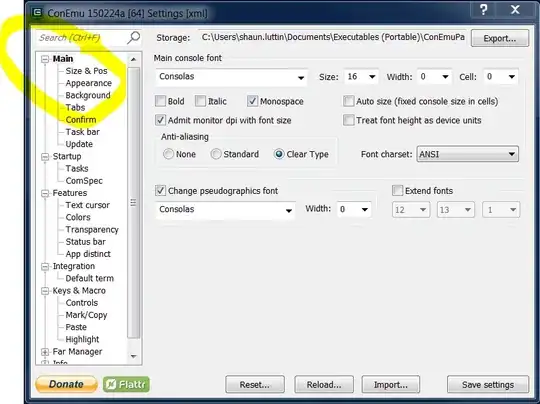

Shaun Luttin
- 2,231
- 8
- 41
- 53
11
Another easy way to change the font size, especially temporarily for a presentation, is to hold the CTRL key and then move the mouse wheel. The size will increase and decrease as you move the wheel up and down.
This trick works in Chrome too, btw.

Ryan Shillington
- 376
- 3
- 8
-
What if I don't have a mouse wheel, e.g. on laptop or tablet? – Aleksei Petrenko Dec 01 '16 at 13:38
-
If you have a touch screen, you can pinch zoom (both in ConEmu and Chrome). – Ryan Shillington Dec 01 '16 at 16:03
-
1Thanks for the tip! I Tried the classic ctrl-NumPad+ -trick and it didn't work. – Jari Turkia Mar 09 '18 at 08:34