When cutting a selection in Vegas, is it possible that it auto-joins the scenes? I mean instead of leaving an empty space.
Asked
Active
Viewed 209 times


1 Answers
4
What you are looking for is called "Auto Ripple."
Click on the auto ripple icon in the main toolbar or press Ctrl-L to toggle Auto Ripple on/off.
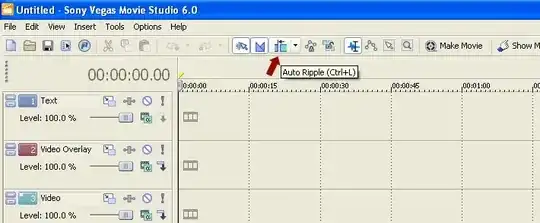
With Auto Ripple turned on, when you remove a clip from the time line, the clips that come after will automatically move to the left to fill in the space.
Video Tutorial: Auto Ripple in Sony Vegas & Movie Studio

Gaff
- 18,569
- 15
- 57
- 68

Robert Cartaino
- 7,033
- 7
- 34
- 48