3

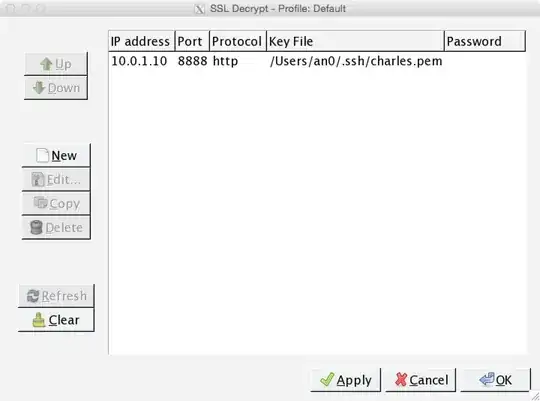
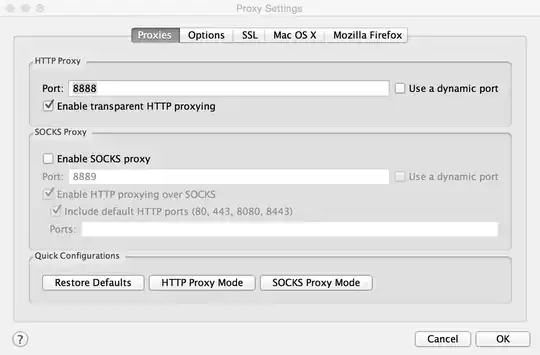
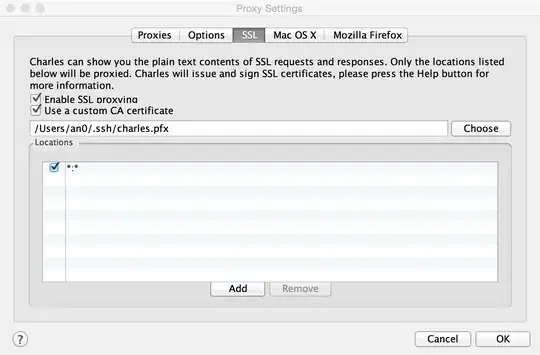
I know I can view decrypted HTTPS data directly in Charles. But I want to view lower level SSL messages in Wireshark. So I setup Charles as the SSL proxy, using my own certificate, and I setup SSL dissector preference in Wireshark with local IP address and my private key.

enter image description here enter image description here enter image description here

However, the messages in Wireshark are still encrypted.

enter image description here

What did I miss?

an0
  • 149
  • 1
  • 6
  • This isn't an InfoSec question, but a application config question. – schroeder Feb 12 '15 at 00:36
  • 1
    @schroeder Really? I posted it here because several related posts I read online all came from here. Where do you suggest me post it? – an0 Feb 12 '15 at 00:45
  • @schroeder - if you check the [help center](http://security.stackexchange.com/help/on-topic) questions about security tools are specifically on topic. Unfortunately, I can't vote against your close vote. – paj28 Feb 12 '15 at 09:20
  • 1
    Interestingly, this was just posted on reddit/netsec https://jimshaver.net/2015/02/11/decrypting-tls-browser-traffic-with-wireshark-the-easy-way/ – paj28 Feb 12 '15 at 10:01
  • (1) Is Charles using the same key for the *leaf* certs it creates as for the *root* cert you have configured? I don't use it and don't see anything in the sketchy doc. (2) Is your connection using plain-RSA key-exchange, NOT DHE or ECDHE aka PFS? (3) What exactly is in your PEM file? Wireshark only supports the OpenSSL "legacy" PKCS#1 form, NOT PKCS#8 and not encrypted. Alternatively, Wireshark supports P12/PFX directly if and only if you specify the password. (nitpick) `.ssh` is a weird place to put SSL (or even SSL-CA) keys. – dave_thompson_085 Feb 12 '15 at 10:11
  • @paj28 Cool trick! Unfortunately, I want to decrypt traffic between my iOS app and other's server. – an0 Feb 12 '15 at 15:09
  • @dave_thompson_085 Thanks. (1) I think Charles only takes a cert not key. I followed these tutorials: http://0x74696d.com/posts/CharlesSSL/, http://codeblog.shape.dk/blog/2014/01/06/custom-ssl-certificate-with-charles-web-proxy/. (2) I don't understand the question because I don't have the knowledges. How can I check? (3) The PEM file was generated following the tutorials above. – an0 Feb 12 '15 at 15:21
  • Ok, you're into pretty advanced stuff here. I think your best option is to take an open-source intercepting proxy (probably Zap) and edit the source code so it logs the session key. You sure you need to look at the raw SSL? – paj28 Feb 12 '15 at 15:32
  • @paj28 Currently I'm looking into why some HTTPS requests time out. I've already ruled out DNS and web server issues so I think I need to monitor how the the SSL/TCP connections are created to check whether it is a connection issue. – an0 Feb 12 '15 at 15:39
  • You control the server? You may be able to log the SSL session key server-side – paj28 Feb 12 '15 at 16:08
  • @paj28 Unfortunately, no. – an0 Feb 12 '15 at 16:09
  • 1
    (1) Charles is using a .pfx file, which contains a cert (or chain, not applicable here) *and* key. The tutorial you link to says about four times you are generating both cert and key for the fake CA. But my question is the key used in and with the *leaf* certs not the CA cert. (2) The selected ciphersuite is in the ServerHello message which you should see in Wireshark; the name has several components that specify the key-exchange used, the symmetric cipher, and the hash for HMAC (and/or KDF in TLS1.2). But: ... – dave_thompson_085 Feb 14 '15 at 00:05
  • ... (3) That tutorial creates 2 PEM files, but I'll assume you used ca_key.pem. If you used OpenSSL 1.0.0 or higher, `req -new -keyout` does write in PKCS#8 form, and with the default config also encrypts. To "fix" that, run `openssl rsa ca_oldkey.pem` in the directory where it is, and use ca_oldkey.pem instead in Wireshark as the server privatekey. Or as I said, just use the .pfx with password. But if it works this gives you the data on the connection from your client to Charles. I just noticed you do have the data in Charles, so it got there okay. ... – dave_thompson_085 Feb 14 '15 at 00:14
  • ... If the problem is on the connection from Charles to the server, that's very different. You can only decrypt that with the *server*'s privatekey (and plain-RSA again) and if it's not your server they won't give you that. Or, almost as @paj28 says, get Charles or other proxy to log the *premaster* or *master* secret (which is different for each session) and give that to Wireshark (with a mapping to the session(s)). – dave_thompson_085 Feb 14 '15 at 00:18
  • @dave_thompson_085 thanks very much! I've already tried .pfx with password. It doesn't work. Cipher Suite is TLS_RSA_WITH_RC4_128_MD5 (0x0004). One thing I've noticed and don't understand is: Charles is middle man here and its proxy is localhost:8888, but in Wireshark I can't see communication between localhost and the proxy but only between localhost and remote server, i.e., it appears as if the middle man does not exist at all. However, I can see all the decrypted communications in Charles. Is it normal? – an0 Feb 17 '15 at 16:01
  • @dave_thompson_085 also I tried `openssl rsa` but it generates the exactly same output as input. So I guess the format of .pem is already good for Wireshark. – an0 Feb 17 '15 at 16:06
  • I checked and I was partly wrong; the default config for `req -new[key]` doesn't encrypt, so if you used that and OpenSSL 0.9.8 you did get legacy format; to confirm check the first line: Wireshark wants `-----BEGIN RSA PRIVATE KEY-----` not `-----BEGIN PRIVATE KEY-----`. **localhost** If you mean your app is told to use localhost:8888 as its proxy, that is NOT the same thing as using your "local IP" 10.0.1.10. localhost is IP address 127.0.0.1 aka loopback, and is (treated as) routed over a special loopback interface not a real interface. ... – dave_thompson_085 Feb 20 '15 at 01:16
  • ... I don't know for MacOSX, but Wireshark on Windows can't capture *either* loopback traffic *or* traffic within one machine using a real (routable) IPaddr, and my experience with other net captures on Unix has been erratic. You may need to put your app(s) and Charles on different machines. **outbound** I hadn't realized you are (also?) trying to decrypt connections *from* Charles to the real server(s). You can't do that with Charles' key at all. Only the per-session pre/master secret could help you there. – dave_thompson_085 Feb 20 '15 at 01:21
  • @dave_thompson_085 I can confirm my .pem is in good shape. By localhost I mean local IP. I know I can't decrypt traffics between Charles and server without knowing its secret. I only want to decrypt traffics between my app and Charles in Wireshark. So you mean if Charles and Wireshark are on the same machine I can't do that? – an0 Feb 23 '15 at 15:08
  • If the two *programs* (here your app and Charles) are on the same *Windows* machine I've found no way to get Wireshark to capture that. I've seen varying results for other captures on (several) Unixes, and have no good basis to guess about *MacOSX*, which to my understanding is mostly Unix-like but sometimes not. Also there could be other tools that can *capture* network data into a file format Wireshark can *read*, like pcap or -ng. But that's a somewhat different question than you asked, and not really my expertise, sorry. – dave_thompson_085 Feb 25 '15 at 04:10
  • @dave_thompson_085 thanks a lot anyway! At least I learned something:) – an0 Feb 25 '15 at 14:52

1 Answers1

1

I encountered the exact same problem with Charles Proxy in combination with Wireshark.

I think the issue is that Charles sends two (or more) certificates to the client (check the Certificate message sent from proxy to the client). Wireshark will then use the first certificate in that list, which probably will not match the private key you generated.

(This is exactly what user dave_thompson_85 is wondering in the comments.)

I have checked this by extracting the certificate from Wireshark. Note that Wireshark extracts the certificate in .der format. Then I have converted the .der-file to a .pem certificate:

openssl x509 -inform DER -outform PEM -text -in wireshark_charles.der -out wireshark_charles.pem

I also have converted the .pem to a .crt, but this is not necessary.

Certificate sent by Charles to client

$ openssl x509 -noout -modulus -in wireshark_charles.crt | openssl md5

7a37a32781daf79402623c19ac9c8d7f

Custom certificate set up in Charles

$ openssl x509 -noout -modulus -in charles_custom.crt | openssl md5

62ea5ed061fca62efaaecbbb0226b08e

The corresponding private key

$ openssl rsa -noout -modulus -in charles_custom.pem | openssl md5

62ea5ed061fca62efaaecbbb0226b08e

The modulus of the certificate sent by Charles does not match the modulus of the custom generated private key.

And Wireshark also logs this issue during the SSL Dissection:

ssl_decrypt_pre_master_secret wrong pre_master_secret length (128, expected 48)
ssl_generate_pre_master_secret: can't decrypt pre master secret

Charles generates a new per-host certificate using the custom certificate as root certificate. Unfortunately, I have not found a way to extract this per-host private key generated by Charles. I suggest to use Burp Proxy. In Burp you can select which type of certificate you want to use.
Safaci
  • 11
  • 2