3

In Excel 2010, I need to go through a data table row by row and manipulate the data in VBA.

My original function reads like this:

Private Function GetValue(ByVal myRange As Excel.Range, ByVal strCol As String) As String
    Dim myCell As Object
    Set myCell = myRange.Cells(, strCol) 
    GetValue = myCell.Value 
End Function

I call it like this:

GetValue(myRow, "AE")  

myRow is an Excel.Range representing a row.
"AE" is the column index.

I want to convert to use column names instead of column indexes because users may choose to add or remove columns in the future. I identified a range of cells as a table in Excel, named the table, and chose unique column names.

This means I would now call the function by using:

GetValue(myRow, "column_name")

but I can't find examples where I can specify only the column name without also specifying the row.

Is this even feasible?

Excellll
  • 12,627
  • 11
  • 51
  • 78
chabzjo
  • 189
  • 1
  • 1
  • 5

2 Answers2

5

The code from other answer didn't compile for me, but it allowed me to do some further research.

Inspired by How do i loop an excel 2010 table by using his name & column reference? and How to loop though a table and access row items by their column header?, I ended up using:

Private Function GetValue(ByVal myRange As Excel.Range, ByVal strCol As String) As String
    GetValue = myRange.Columns(myRange.ListObject.ListColumns(strCol).Range.Column).Value
End Function
chabzjo
  • 189
  • 1
  • 1
  • 5
1

Consider:

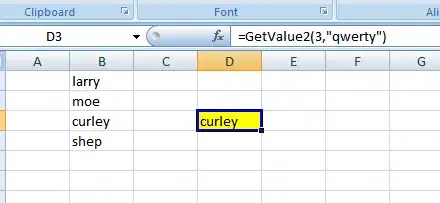
Public Function GetValue2(ByVal myRow As Long, ByVal strColumnName As String) As String
    Dim myCell As Object

    Set myCell = Cells(myRow, Range(strColumnName).Column)
    GetValue2 = myCell.Value
End Function

In this example, I "named" column B "qwerty"

enter image description here

Please note there will be potential volatility problems with this function.

Gary's Student
  • 19,266
  • 6
  • 25
  • 39
  • Can you explain what you mean by volatility problems? – chabzjo Feb 10 '15 at 19:47
  • I mean that if you change the contents of column **B,** the function is not smart enough to know it is necessary to recalculate itself. – Gary's Student Feb 10 '15 at 19:54
  • Actually, having the function knowing it is necessary to recalculate is not part of my requirements. But thanks for thinking ahead. :) – chabzjo Feb 11 '15 at 21:06