2

Sony Vegas is crashing the moment I press render regardless the format chosen on a freshly installed Windows 8.1.

Error:

enter image description here

    Problem signature:
  Problem Event Name:   APPCRASH
  Application Name: vegas130.exe
  Application Version:  13.0.0.428
  Application Timestamp:    5463a76e
  Fault Module Name:    clr.dll
  Fault Module Version: 4.5.27.0
  Fault Module Timestamp:   545ca861
  Exception Code:   c0000005
  Exception Offset: 000000000006c854
  OS Version:   6.3.9600.2.0.0.256.48
  Locale ID:    1033
  Additional Information 1: 1cf0
  Additional Information 2: 1cf0e7963731731fc6a78a515dc4d96a
  Additional Information 3: ea9d
  Additional Information 4: ea9de657ddafbdc1a4be657754c9b9f2

I ran sfc /scannow and Windows Updates but no errors were found.

Luckyly I found a solution in this thread (Vegas closes upon any attempt to render): Clr.dll in Net Framework 4.5 causes Vegas to crash, this hotfix claims to fix it. However this hotfix is only applicable to Net Framework 4.0, and Windows 8.1 comes bundled with 4.5.

Net Framework repair tool won't provide a repair option:
enter image description here

enter image description here

enter image description here

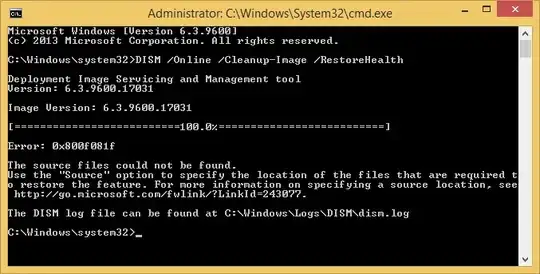
And attempting to repair Net Framework using this command fails to work:

DISM /Online /Cleanup-Image /RestoreHealth
enter image description here

What else can I do to fix this?

Gabriel
  • 2,860
  • 11
  • 36
  • 51
  • 2
    The hotfix you linked to is for `.NET Framework 4.0` applications. `Windows 8.1` has `.NET Framework 4.5.x` by default which is an in-place replacement for `.NET Framework 4.0.x`, in otherwise the hotfix does not apply to your operating system. Due to the age of the hotfix I would be shocked if it had not already been rolled into a later version of `.NET Framework 4.0` anyways – Ramhound Jan 28 '15 at 18:22
  • Thanks for clarifying, I will deviate the question from the hotfix. – Gabriel Jan 28 '15 at 18:24
  • Even if you were running `Windows 7` with `.NET Framework 4.0.x` installed based on the problem signature and the signature described in the support article, they are not even close, the exception offset isn't even the same. I assume you have install all available updates? – Ramhound Jan 28 '15 at 18:27
  • You will need to use the DISM tool against a `Windows 8.1` installation since your `WinSxS` directory appears to be empty. Your `WinSxS` source directory not existing is a separate problem you should solve. – Ramhound Jan 28 '15 at 18:55
  • WinSxS has many folders and is 6.63 GBs large. Do you suggest to replace this folder with a WinSxS copy from another Windows 8.1 installation? – Gabriel Jan 28 '15 at 19:16
  • No; You instead need to use an installation disk as the source, so your own component store can be fixed, then use SFC to repair the damage if it exists. – Ramhound Jan 28 '15 at 19:17
  • That means running the installation disk with recovery mode and entering the DISM command? – Gabriel Jan 28 '15 at 19:21
  • I dont think your .NET installation has any issues. Its with Sony Vegas. Just that it crashes in clr.dll – Ganesh R. Jan 28 '15 at 19:24
  • Hi Ganesh, yes, so far Sony Vegas is the only program having this issue, I tested different Vegas versions and the result is the same. My old computer works perfectly with Vegas and Windows 8.1. – Gabriel Jan 28 '15 at 19:29
  • You don't need to boot into WinRE in order to run DISM against local Source. The entire idea is to repair the online source ( i.e. your installation ). – Ramhound Jan 28 '15 at 19:56
  • Ramhound can you provide a documentation link? I'm completely new to this DISM workaround. – Gabriel Jan 28 '15 at 20:16

1 Answers1

1

I installed Microsoft .NET Framework 4.6 RC (DP46-KB3006563-x86-x64-AllOS-ENU.exe) and the error is gone!

Gabriel
  • 2,860
  • 11
  • 36
  • 51