3

Using Windows 8.1 Professional edition I'm able to use run as a command within the Windows Run Dialogue (accessed using Windows + r:
Run Dialogue Example

In the regular Windows 8.1 edition (not Professional), typing run here will produce an error about how it isn't recognised as a command, but in Windows 8.1 Professional this causes the Run dialogue to close and nothing more to happen.

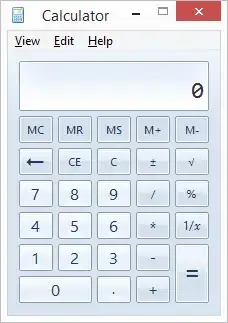
However we can then take this a step further: Typing run calc opens the Calculator application (just as typing calc by itself would):
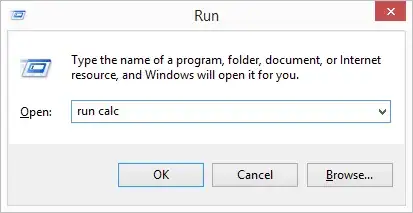
Run Calc Example

Voilà:

Result

We can then take this even further by chaining the run command. run run calc also opens the calculator, as does run run run run run run run run run calc, etc.
Run Run Calc Example

What is the purpose of allowing run to be executed in Windows' Run dialogue, and why is it possible to chain it? Equally, why is this not available in the regular Windows 8.1 edition?

James Donnelly
  • 223
  • 1
  • 4
  • 11
  • 1
    `Run` is not a regular Windows command line command. I don't have a Windows 8.1 Pro machine handy to test on right now, but have you confirm this on other Win 8.1 machines? Your specific machine may have a `run` batch file or alike someplace in the path. Where is the `run` file actually located in the file system on your machine? – Ƭᴇcʜιᴇ007 Jan 02 '15 at 13:42
  • It is possible on `Windows 8.1 Core` ( there isn't a "home edition" of Windows 8.1 or Windows 8. As for the reason it wasn't working in your tests, that's because of a PATH problem more then likely, because in my testing I had no problems running calc.exe from the run prompt. Which by the way only requires you to type in "calc". – Ramhound Jan 02 '15 at 13:42
  • possible duplicate of [How does the windows run dialog locate executables?](http://superuser.com/questions/87372/how-does-the-windows-run-dialog-locate-executables) – Ramhound Jan 02 '15 at 13:43
  • 2
    @Ramhound The user is pointing out that on Win 8.1 Pro he can run a program, via the Run dialog, named "Run" which seems to be a launcher of some kind(?). Are you saying there is a valid "Run" program on Windows 8.1 (Pro and Core)? – Ƭᴇcʜιᴇ007 Jan 02 '15 at 14:33
  • @Ƭᴇcʜιᴇ007 - No; I am not. I am saying I was able to use the run prompt to start calc.exe on a `Windows 8.1 Core` installation within a virtual box. As for `run` being a standard command line command I will have to get back with you on that. – Ramhound Jan 02 '15 at 14:47
  • 1
    I am using Windows 8.1 Pro, and I am not able to use "run" in the run dialog. If I try to do "run calc", I get "Windows cannot find 'run'. Make sure you typed the name correctly, and then try again.". I would guess that there is a "run.exe" or "run.bat" or somesuch, somewhere in the PATH of James Donnelly's 8.1 Pro machine, or in either the user or machine registry hives under SOFTWARE\Microsoft\Windows\CurrentVersion\App Paths. – Adam Thompson Jan 02 '15 at 14:58

1 Answers1

1

Do you have cygwin installed on the Windows 8.1 Pro machine? Cygwin has a run.exe command included that will make the "run calc" command string work. It doesn't work on a Windows 8.1 machine without a third party software package that provides a "run" command, this is why it fails on most other machines.

Per Salmi
  • 799
  • 5
  • 14
  • I'm going to mark this as the answer. Unfortunately I've no longer got access to the machine which had `run` as an available command. – James Donnelly Jan 13 '15 at 10:08