0

I have Acer 5755G laptop with following spec: 4GB RAM 750 GB WD HDD Intel i5 2nd Gen Windows 8.1 Update 1 64 bit

Laptop is 2 years old.

Previously I had Windows 7 64 bit OEM version.

Previously when I had windows 7 the same problem occurred several times. I would simply reinstall the windows. For 2 months it will work fine and later the disk usage will shoot up to 100% again. Recently I formatter my laptop and installed Windows 8.1 Update 1 64 bit. For the first few months it worked fine and again the problem starts.

The laptop is mainly used for:

  1. Browsing internet using Google chrome
  2. Later having doubt on Google Chrome moved onto IE
  3. Using Word
  4. Watching SD videos and sometimes HD videos

The following troubleshooting methods were followed:

  1. Completely disabling the process "SuperFetch"
  2. Completely disabling the process "BITS"
  3. Completely disabling the process "Windows Search"
  4. Disabling automatic windows update
  5. Disabling the Windows defender
  6. Regularly do disk clean-up

Doing the above steps didn't help my laptop to improve the health. I refreshed the windows completely using the recovery option in the PC setting. Didn't help.

So now I have completely formatted my C drive and again installed Windows 8.1 Update 1. Now it is working fine. I am sure that after 2 months the same problem will start.

My hard disk health good. Did disk scan on all my drives. Doesn't show any errors.

Is there is any permanent solution to solve this problem? Or replacing my HDD with a new one will resolve it?

Edit 1: List of softwares I use install all the time: List of softwares
**Edit 2: I have performed Short DST test using Seatools by Seagate. It shows the Short DST failed. But as of now my laptop is working fine. So the 100% disk usage is due to this? Should I replace my HDD?
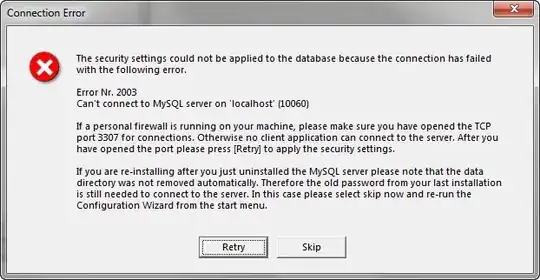
Short DST failed

Vinayak
  • 10,625
  • 10
  • 54
  • 89
Vijayenthiran
  • 31
  • 1
  • 4
  • Windows is not a time bomb (although some might disagree) so there's no reason you'll face the same problem after 2 months. However, if you install the same software you did before and the problem lies with the software (which it probably does), then you'll experience the same problem. We can't answer this question without knowing more. – Vinayak Dec 06 '14 at 14:36
  • Here's the list of softwares that I use all time. [link](http://i.imgur.com/4Z1MrkK.png) – Vijayenthiran Dec 06 '14 at 15:00
  • That still doesn't help much. When you do face the problem again, you may edit this post to let us know more about the symptoms you see. – Vinayak Dec 06 '14 at 15:33
  • follow this and upload the xperf trace: http://pastebin.com/AyxAVU60 – magicandre1981 Dec 07 '14 at 07:17

1 Answers1

0

DST is short for Disk Self Test. Since SeaTools is reporting disk test failure, your HDD has gone kaput and it's time to get a new hard drive. Backup all your data as soon as possible and switch to a new HDD.

If you're curious, you can install and run CrystalDiskInfo which will read the HDD's S.M.A.R.T. data and possibly let you know what's wrong.

Vinayak
  • 10,625
  • 10
  • 54
  • 89
  • Thanks for the answer. My laptop model is Acer 5755G. I am wondering if I can use an SSD and HDD at the same time? Like installing OS in SSD and keeping other stuffs in SSD? – Vijayenthiran Dec 09 '14 at 04:23
  • That's a separate question altogether. You should ask that as a new question, but not before you search superuser.com for similar questions that have been asked and answered before. Also, since most notebooks have a single HDD bay, you'd either have to stick with an SSD or an HDD, but not both. You can have a SSD and HDD together by using a HDD caddy which will replace your optical drive bay (so, no CD/DVD drive). If you don't wanna lose your optical drive, but still need SSD like performance, [SSHDs](http://tiny.cc/8c9kqx) might be something to look at. – Vinayak Dec 09 '14 at 06:51