1

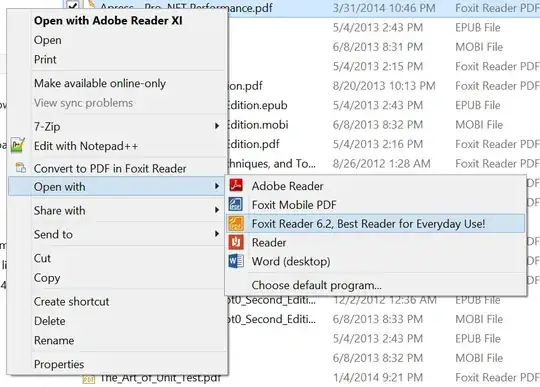
I'm using Windows 8.1 and want to change the text of an item in "open with" context menu of windows explorer. For example:

enter image description here

It's just stupid to me to have such a long postfix like "Best Reader for Everyday Use!". How can I change the text to "Foxit Reader 6.2"?

Jeffrey Zhao
  • 111
  • 2
  • possible duplicate of [Windows: How to remove items from the right click (context) menu?](http://superuser.com/questions/5011/windows-how-to-remove-items-from-the-right-click-context-menu) – Ƭᴇcʜιᴇ007 Sep 05 '14 at 19:20
  • See [Add, Remove, Edit Context Menu items in Windows 7 | 8](http://www.thewindowsclub.com/remove-click-context-menu-items-editors) – DavidPostill Sep 05 '14 at 19:29

1 Answers1

1

The name comes from the description of the executable. Find the executable file for Foxit, and right click on it for properties and look at the description, it should match that context menu item.

Unfortunately the executable description is baked into the executable itself when it is compiled, so you would have to modify the .exe with a tool such as Resource Hacker. Be sure to make a copy of the executable before you modify it though, in case you break something. Unfortunately I don't know much about Resource Hacker, so I can't help beyond this.
Adam
  • 1,558
  • 11
  • 13
  • 2
    Thanks Adam, I do find the description that match the long text, and it's not changeable. Besides, I also searched the string in regedit.exe and found four items. I've changed the `FriendlyAppName` in `HKEY_CLASSES_ROOT\Local Settings\Software\Microsoft\Windows\Shell\MuiCache` and it seems work. Do you know are there any possible side effects if I do this? – Jeffrey Zhao Sep 05 '14 at 17:02
  • Good call, I didn't know about the `FriendlyAppName` field. I can't imagine any side effects, because it's just editing a string. – Adam Sep 05 '14 at 17:12
  • 1
    The name comes from whatever the install program was programmed to use. It doesn't have to be the exe description. – DavidPostill Sep 05 '14 at 17:21
  • 1
    @JeffreyZhao: Post your MuiCache find as an answer. Since HKCR combines HKLM and HKCU, you can also edit the values under `HKEY_CURRENT_USER\Software\Classes\Local Settings\Software\Microsoft\Windows\Shell\MuiCache`. – Karan Sep 06 '14 at 02:47