2

When deploying updates for MS13-081, on multiple systems running Windows 7 Embedded SP1 x64, Usbser.sys is not being updated as it should be according to the KB Article.

An affected system reports the update as installed, and will not let me run the installer again without uninstalling first, but the file itself is not being updated. I've tried uninstalling and re-installing all MS13-081 updates, and rebooted the system several times.

I've tried Googling for problems related to this update, but none are discussing issues with this particular file and all I've found appear to just say to uninstall/reinstall/reboot as I've already done.

Short of manually copying a known-good Usbser.sys from a non-Embedded system, what else should I try for troubleshooting? Also, why would Windows register an update as installed when it so obviously is not?


File Details

            Current             Expected per MS13-081
Size        32,768 B            33,280 B
Version     6.1.7601.17514      6.1.7601.18247
Modified    2010-11-20 10:43Z   2013-08-29 01:29Z

Current Hashes

MD5  4ACEE387FA8FD39F83564FCD2FC234F2
SHA1 EFBF847CD0FAA8B2205D059195404B58C17B638C

Output of for /r %windir% %G in (usbser.*) do fsutil hardlink list "%~G" & echo ---
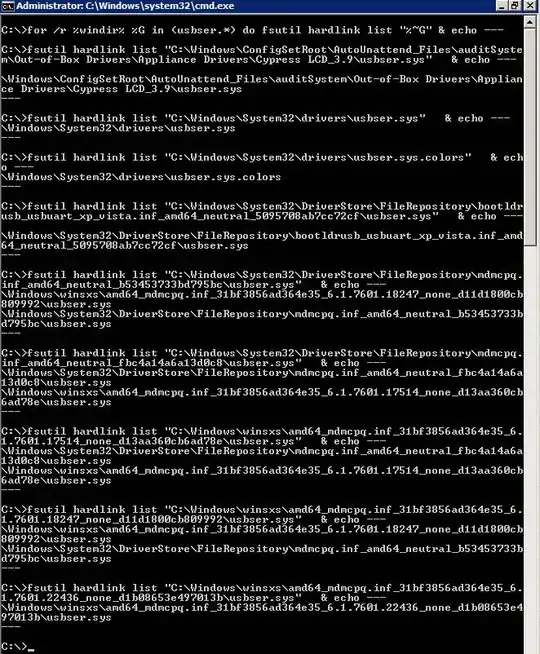
enter image description here


SFC /scannow has been run, and reported that it fixed a number of issues. However, this specific file was not listed in the report. (In fact, no .sys files were listed at all.) After a reboot, the file is still not updated.

Iszi
  • 13,585
  • 44
  • 113
  • 181
  • Did you check the system files integrity already (i.e. `sfc /scannow`)? Is that the only update which isn't being applied properly? What are the details/hashes of the current `usbser.sys` file? – and31415 Aug 07 '14 at 11:21
  • @and31415 I'm not aware of any other updates with problems on these systems yet. I'll see if I can do an sfc on usbser.sys, and will update the question with more information on the file. – Iszi Aug 07 '14 at 18:00
  • The current file is the one bundled with SP1: the version, size, and hashes match. Make sure the update is installed, then run the following command from an elevated command prompt and post here the output: `for /r %windir% %G in (usbser.*) do fsutil hardlink list "%~G" & echo ---` – and31415 Aug 07 '14 at 23:38
  • @and31415 Would you mind giving me an idea of what you're looking for from that output? To paste the whole thing would be a fairly large screenshot. The output for `fsutil hardlink list C:\Windows\System32\drivers\usbser.sys` is `\Windows\System32\drivers\usbser.sys`. There do appear to also be other `usbser.sys` files scattered about subfolders of `C:\Windows\System32\DriverStore` and `C:\Windows\winsxs` and one in a subfolder of `C:\Windows\ConfigSetRoot\AutoUnattend_Files`. – Iszi Aug 08 '14 at 19:03
  • I'm not sure what the relevancy is of `usbser.sys` outside of `C:\Windows\System32\drivers` for the purposes of this question, but some do appear to have hardlinks to locations in those other folders - none point to the specific file I'm having a problem with. It's also interesting that some of those other `usbser.sys` files show the version number I'm looking for. – Iszi Aug 08 '14 at 19:05
  • Well, I suggested you to run a specific command because that's entirely relevant. In fact, the reason the update is applied successfully is because the installed files are located in the `winsxs` folder, and usually they should be hard-linked in other places. Basically you should delete the old `usbser.sys` and create a hard link to the up-to-date version. However, without the full command output, I can't tell you for sure whether there are other possible issues that might need to be fixed, too. – and31415 Aug 09 '14 at 13:30
  • @and31415 Thanks for the feedback. Added command output to the question. Sounds to me like an `sfc /scannow` should fix this, then? – Iszi Aug 11 '14 at 14:14
  • The `sfc` utility might help, yes; it's worth running it anyway. Whether the issues is fixed or not, report back your findings. – and31415 Aug 11 '14 at 14:30
  • @and31415 I take it the only alternative is to manually create the hardlink as you described? What about the "other possible issues" you spoke of - are any visible in the pasted output? – Iszi Aug 11 '14 at 14:32
  • @and31415 Please see the latest edit. I'm very hesitant to do a manual fix of the hardlink on this system. Do you have other suggestions? – Iszi Aug 21 '14 at 19:43
  • I did some tests using Windows 7 x64 (Windows 7 Embedded is modular and no standard image exist). Here are the hard links before and after: http://pastebin.com/hWEtKpTT By comparing your output against mine, it looks like I was wrong. The `usbser.sys` file in the `drivers` folder might not be meant to be hardlinked at all; in fact, it's missing in my case. Granted, I used a non-Embedded system, but the update is the same anyway. BTW, you got some extra copies, like those stored in the `Cypress LCD_3.9` and `bootldrusb_usbuart_xp_vista.etc` folders. What are the details for those? – and31415 Aug 31 '14 at 14:32

0 Answers0