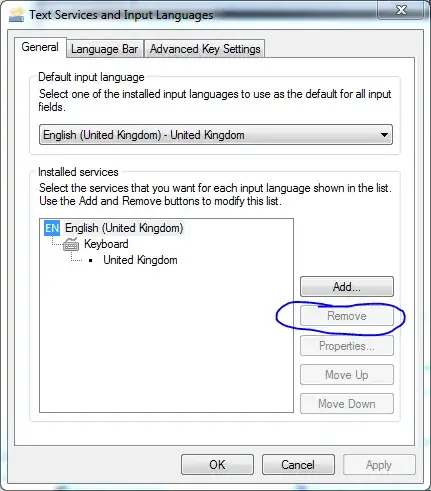
Following this question I'd like to try and completely remove the Qwerty layout. However, the default tool that comes with Windows won't allow such change. I wonder if there is a lower-level way to achieve this.
Asked
Active
Viewed 1,567 times


2 Answers
3
Open Control Panel then "Region and Language".
Next, go to the "Keyboards and Languages" Tab.
Simply click on any keyboard and as long as you have a secondary keyboard, you should see the option to remove.

Gaff
- 18,569
- 15
- 57
- 68

William Hilsum
- 116,650
- 19
- 182
- 266
-
1Oh, I see you found this thread already.:) Thanks! I forgot to select the Dvorak layout as the default for all input, and now I'm able to remove it. – akurtser Dec 01 '09 at 11:20
-
I have done this (removed US-English), but for some reason, Windows still auto-switches back to it periodically, and it's available in the Language Bar? – Ben Mosher May 01 '12 at 13:51
-
@BenMosher This setting is per user, so maybe you are logged into Windows under a different account when that happens? – Mr Lister Aug 24 '12 at 12:52
2
The key issue is that the one you want to remove cannot be the current default. Take note of the top group labeled: 'Default Input Language' and ensure that the one you want to remove is not the default. Once you correct that, the remove is no longer grayed out.

WilliamKF
- 7,778
- 34
- 103
- 145