2

After years of ad-free browsing, I am suddenly confronted with Amazon pop-ups on other websites. This is self-inflicted, because earlier today I clicked on "Yes" on an Amazon banner on Amazon.com and Amazon.co.uk, thinking it would help me on those pages alone.

So how do I get rid of it again?
enter image description here

Stephen Rauch
  • 3,091
  • 10
  • 23
  • 26
Řídící
  • 260
  • 1
  • 4
  • 13
  • What browser version? If this is the shopping assistant I am thinking of (Spigot) it can be fairly nasty and invasive. You can try http://www.go-remove-malware.com/how-to-remove-spigot-toolbar-and-search-redirect/ – HeXanon May 05 '14 at 10:27
  • @HeXanon Safari for Mac 7.0.3 – Řídící May 05 '14 at 10:28
  • I would take a look at the addons and remove anything you don't recognise. – HeXanon May 05 '14 at 10:30
  • @HeXanon There are no suspicious extensions or plug-ins. – Řídící May 05 '14 at 10:33
  • You willing to delete the user profile for Safari anyways? Because what you clicked on likely wasn't generated by Amazon. – Ramhound May 05 '14 at 10:43
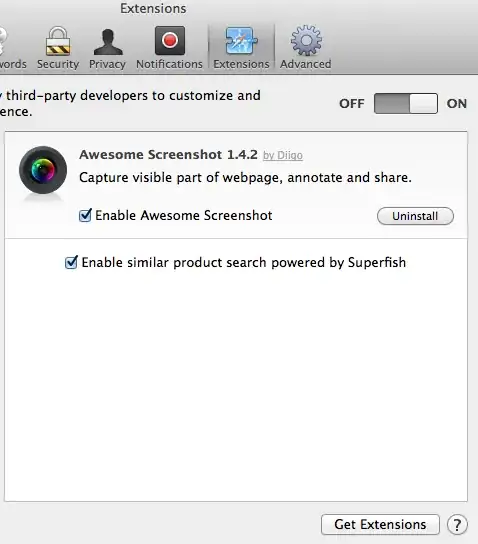
  • @Ramhound I found it. Superfish. – Řídící May 05 '14 at 10:47
  • @GlenTheUdderboat - As I suspected. Superfish has nothing to do with Amazon. I don't know the reason you got a request to install it. – Ramhound May 05 '14 at 11:08
  • @Ramhound Since my browser is ad-free and pop-up free, I assumed that the yellow bar on top of the Amazon page was Amazon's. But all the blockers in the world probably don't help against extensions that I install myself. :) Anyway, Amazon is cleared, but I'll leave the question as it is, so that it can be found by others having this problem. – Řídící May 05 '14 at 11:15

1 Answers1

4

I found the culprit. It was in an extension I didn't initially think was associated with it. Removed all of it.

enter image description here

Řídící
  • 260
  • 1
  • 4
  • 13