10

With Firefox 29, it no longer displays the full title. For example, in this screen shot here, it only display the beginning of "The New York Times - Breaking News, World News & Multimedia". How can I make it display the whole thing?

EDIT (for clarification): I'd like to see the full title of the web page of the tab I am on at all times (hovering the cursor would not work for me). Making the tab full width only works if I have 1 or 2 tabs, but most of the time I have many more tabs so this wouldn't work for me.
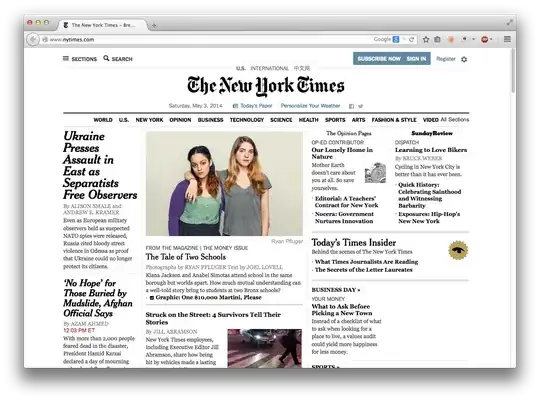
NY Times page

ceiling cat
  • 4,327
  • 4
  • 24
  • 32
  • 1
    Moving your mouse pointer over the title excerpt doesn't count, does it? – Daniel Beck May 03 '14 at 18:52
  • Nope, although I should have made this clear... – ceiling cat May 03 '14 at 18:53
  • title bar, or tab title? Or both? – Austin T French May 03 '14 at 18:59
  • There's [Tab Width](http://en.design-noir.de/mozilla/tab-width/) plugin, but I doubt setting a long width for all tabs will be practical. – Daniel Beck May 03 '14 at 19:01
  • @AthomSfere I'd like to see the full title of the tab I am on. I think it only makes sense with a title bar. – ceiling cat May 03 '14 at 19:06
  • @DanielBeck Right. That wouldn't work. – ceiling cat May 03 '14 at 19:07
  • 1
    Most of the browsers do this. Although I admit more of the title should be shown since you only have one tab. But this isn't exactly "new" behavior. – Ramhound May 03 '14 at 19:18
  • Also, for Windows, you can show the Title bar by typing `about:config` in the address bar, navigating to the **`browser.tabs.drawInTitlebar`** entry, and setting it to **false**. – TylerH May 24 '14 at 02:04
  • @DanielBeck Hovering isn't a solution, particularly when you have lot of tabs. Instead of just a glance at the title bar, you have to locate the tab, move the mouse there and wait for the tooltip to appear. – PhiLho Nov 12 '14 at 09:08

2 Answers2

16

Go to the menu, and Customise.

At the bottom-left of the customisation menu is a toggle button labelled Title Bar. This is the button you want. (It reverts to old-style top-of-window layout.)

This answer shows pictures of each menu.

Tynam
  • 563
  • 5
  • 13
  • 1
    Useful answer, but not perfect (that's Firefox' fault), as we loose the vertical space Firefox tried to gain by using the title space. Being side-by-side with the menu would be better. – PhiLho Nov 12 '14 at 09:10
5

On the Firefox menu, click View > Toolbars > Customize; the Customize Firefox page appears. At the bottom left corner of the Customize Firefox page click the Title Bar button. Clicking this button toggles the display of the Firefox title on the top-left corner of the browser window.

Scott
  • 51
  • 1
  • 1