-1

I want to know where I can change the location where Notepad++ saves the config files (which is by default the appdata folder, if not checked that it should not use this folder)

The reason why I want to know that: I am working with 2 computers at the same time (webdesign) and it would be super cool when I could store the condig files automatically in my Dropbox-Folder, so that the other computer automatically updates the dropbox folder and with the next start of Notepad++ it uses the new configuration. Since I already have all my Webdesign stuff in the Cloud, which is installed on both computers and the sessions are stored in the config-folder, it automatically would open the same documents on both computer. Example: I open Document 1 on Computer 1, this is stored in the session, the session is synced with the cloud and Computer 2. With the next start of NP++ Computer 2 automatically also has openned Document 1.

Any other ideas for this kind of usage? Feel free to tell me!

3 Answers3

0

In the absence of finding a direct answer, you could use two batch files. One that you use before you start Notepad++ that copies the dropbox backup directory for the Notepad++ configuration files to the local drive. This batch file could also be used to start Notepad++. And another that you run when you finish using Notepad++ that copies all of the Notepad++ configuration files to a dropbox directory.

  • Sounds like a good idea... But how do I schedule the batch files so that it automatically starts with the start of notepad and when I close it...? Or would I have to open them myself? – TheElbenreich Mar 03 '14 at 14:08
0

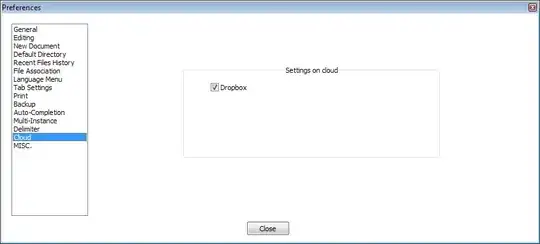
There is now a setting for this under Preferences -> Cloud. If you tick "Dropbox" and restart Notepad++, it will create a "Notepad++" folder in your Dropbox folder and store its config there.

settings dialog

Blorgbeard
  • 2,845
  • 3
  • 30
  • 31
  • That is pretty awesome! Thanks for the answer :) – TheElbenreich Jun 26 '14 at 14:41
  • In addition to this I also drop the Plugins folder into Dropbox folder and add a Symlink on each computer to the dropbox folder so the plugins are in sync. I used to Symlink the lot before Notepad++ had cloud sync – CAD bloke Sep 26 '15 at 11:57
0

Settings --> Preferences --> Cloud

Select Dropbox or OneDrive (auto-detected if previously installed) will automatically create a Notepad++ folder inside the correspondent service folder to store and sync the following files:

  1. config.xml
  2. contextMenu.xml
  3. langs.xml
  4. shortcuts.xml
  5. styler.xml

Screenshot:

enter image description here

Currently you can select only one service at the time, and this service settings will be the one who decides the sync priority and direction.

Note: the Dropbox or OneDrive service must be enabled to be able to sync the files, else nothing will be synced.

Donald Duck
  • 2,473
  • 10
  • 29
  • 45
warmth
  • 1,026
  • 3
  • 13
  • 16