16

I've had great success with git, version controlling, sharing and collaborating on my programming projects, and would love to do the same with photoshop .psds, illustrator .ais and maya projects. Maya, as you may know, is a brilliant 3D modelling and rendering kit, but its projects are saved sort of like a programming framework, with various directories for source images and textures and the like.
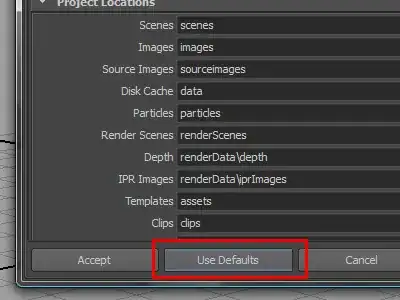
default directory structure settings

Is it an industry practise to use git in this regard? It would be incredible to open source a 3D movie or the 3D files of a game on github!

Obviously all files are just numbers, so in theory git would be fine only updating the parts of the .jpegs or maya binaries that have changed, but do you think in reality this would this cause data corruption and tears? Like I say, I'd like to do the same with photoshop and illustrator files.

If git is not an option, how else should I version, collaborate and open source maya and adobe projects?

Starkers
  • 2,306
  • 7
  • 31
  • 36
  • [Tactic](http://www.southpawtech.com/tactic/) is an open source option for file versioning of 3D assets. Personally, I use Dropbox in my workflow. – John Feb 12 '14 at 21:04
  • i use mercurial, works fine for all but the biggest assets, and those should use bigfiles extension. – joojaa Aug 03 '14 at 12:49

2 Answers2

22

One thing to keep in mind is that git does not work well with really large repo's or files.

Here is an article about why Facebook isn't using git for their version control. Basically git didn't scale well enough.

Github has a good explanation of git's limitations here:

git can handle almost any file that you throw at it (see an explanation of binary diff)

Photoshop

You should have no problem using git to version a photoshop file. (Assuming they are relatively small)

Maya

Maya likely generates too big of projects to scale well in git. Especially if you plan on pushing to a remote like github or gitlab.

Most of the people I know who use Maya or similar software, keep their work on a network mounted drive to share with just a couple of collaborators. When a version is ready for release, it is rendered and hosted on a ftp site.

Additional Resources

Semantic Versioning

https://stackoverflow.com/questions/540535/managing-large-binary-files-with-git

spuder
  • 9,854
  • 4
  • 42
  • 57
  • Awesome! Regarding versioning on my sytem, rather than collaboration, do you reckon mercurial would hold up well to keep track of a maya project? While like you say, network drives are certainly a simple way to share a project, could mercurial be used for collaboration? – Starkers Feb 12 '14 at 08:30
  • any version control system likely won't handle large changes (like video or 3d models). The best option will probably to go old school and just use version numbers (with semantic versioning). For reference, the blender community has the same problem http://blender.stackexchange.com/questions/671/does-blender-support-any-form-of-collaborative-editing) – spuder Feb 14 '14 at 23:46
  • Ah okay then, fair enough I'll go old scool. What do you mean be `wont handle` by the way? Crushingly slow, crashes, data-corruption? – Starkers Feb 17 '14 at 12:34
  • Each commit will get slower and slower and the file size will grow very very large. I've seen a 30MB file take up 450MB because of all the changes. – spuder Feb 17 '14 at 18:04
  • Hmm sounds like a lot of bother. Ah well, maybe something will emerge by the time I'm experienced enough to head a team! – Starkers Feb 17 '14 at 18:27
  • maya files are mostly ascii and usually not all that big by the way i use mercurial – joojaa Aug 03 '14 at 12:17
2

I've had this issue for a long time as well. Done quite some research and there are a few options for you to version control your graphical assets. Some of them require your own server (some requires you to specifically run Windows server) and some can be hosted on a third party server. My favorite (although not completely satisfactory) was Timeline from Pixelnovel.

There's a similar question here about Timeline.

In my experience, you should make sure that all your collaborators are using the same version of the software (both Timeline and PS/AI/Maya), older versions of PS requires you to run an older version of Timeline which doesn't handle the working tree the same way as in more up-to-date versions.

I've also version controlled large graphical assets with regular Subversion (no GUI) and I found it wasn't all that bad if you're OK with using the terminal. Of course, things like merging, conflicts etc. isn't possible with binaries but at least you get a neat version management with a structured log. Also, with SVN you can lock a file while working with it (which Timeline does for you).

I prefer not to use git with graphics (though I do for non-binaries) and the points made by spuder are very valid.

miphe
  • 989
  • 2
  • 7
  • 20