1

I just got my new Dell tower and it came with this cable. On one end it had a DVI port and on the other end it had this connector with D and two plus signs:
enter image description here

I need to buy an adapter from this port to VGA. Can someone tell me what is the name for it?

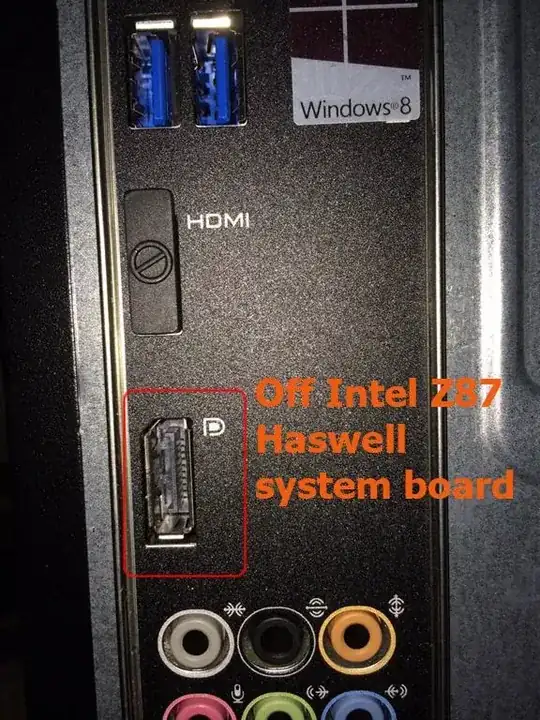
PS. Following the discussion below, here's the picture of the actual port on the Dell XPS 8700 tower itself:
enter image description here

MikeF
  • 578
  • 5
  • 9
  • 23
  • Voting to close as a duplicate of [How do I identify hardware I am unfamiliar with on my computer?](http://superuser.com/questions/709913/how-do-i-identify-hardware-i-am-unfamiliar-with-on-my-computer) as per this [meta question](http://meta.superuser.com/questions/7647/are-hardware-port-cable-etc-visual-identification-questions-allowed-or-not) – Journeyman Geek Feb 06 '14 at 11:13

2 Answers2

1

What you are looking at is a DisplayPort connector.

It's a pretty good replacement for what we in many cases use VGA and DVI for.

Thor
  • 3,970
  • 26
  • 31
  • Awesome. Thanks! I need it to be able to plug in my old monitor (while installing the OS and other software on this Dell.) PS. Can't upvote it... not enough rep :( – MikeF Feb 06 '14 at 09:08
  • @MikeF That's alright; if it solved your question, feel free to mark it as the answer once possible. A remark on DisplayPort is that it is becoming increasingly popular, and does technically supersede DVI (which superseded VGA) - not to mention it can also carry audio! (If there's support on both ends, though.) – Thor Feb 06 '14 at 13:17
-2

The picture you show in your question looks like a DVI-D, which is a digital only output.

In order to send this signal to a VGA monitor, you will need an active converter (the cheap 10 bucks DVI-I to VGA adapters won't work).

Unless you need to connect it to a special display device, it would probably be cheaper for you to buy a new monitor than such a converter.

LeFauve
  • 230
  • 1
  • 3
  • I was looking to get this: http://www.amazon.com/Cable-Matters-Plated-DisplayPort-Adapter/dp/B005H3Q56I/ref=sr_1_2?ie=UTF8&qid=1391677773&sr=8-2&keywords=displayport+to+vga or this one: http://www.monoprice.com/Product/?c_id=104&cp_id=10428&cs_id=1042801&p_id=5135&seq=1&format=1#largeimage Why wouldn't it work? – MikeF Feb 06 '14 at 20:55
  • Well they are active adapters so they will work. I'm just surprise by the low price. Around here you have to pay 60$ for something like that. With 20" monitors starting at 99$ it would have been better to change the monitor, but not if you find a 10$ converter. However, the models you list have a male display port, so they won't fit your cable. What you need is a dvi-d to vga converter and a classical vga to vga cable. I found some of them very cheap on Amazon but user reviews says they didn't work so you'd better read those reviews carefully before choosing one. – LeFauve Feb 06 '14 at 23:55
  • I just want to insist on the DVI-**D** for the converter. A DVI-I to vga will **not** work (if the last letter isn't given, like "DVI to VGA", it will probably be a DVI-I). – LeFauve Feb 06 '14 at 23:59
  • Hmm. I updated my original question with the picture of the actual port. Is it really a DVI-D port? – MikeF Feb 07 '14 at 02:30
  • 1
    Ok... So this is a female display port. Then, the two converters you listed should work (I'd go for the one with the small cable since bulky monoblock adapters can easily damage your graphic card if something hit them (also they will allow you to put your pc closer from the wall)) – LeFauve Feb 07 '14 at 06:14