2

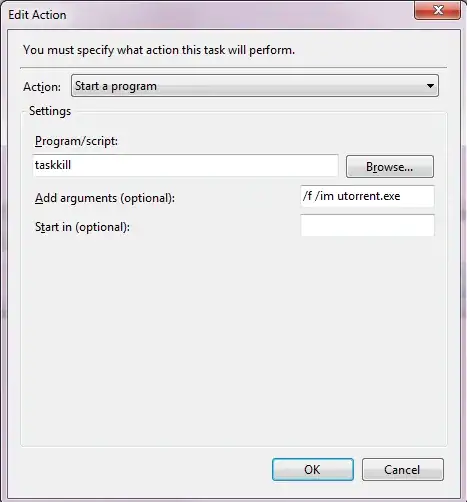
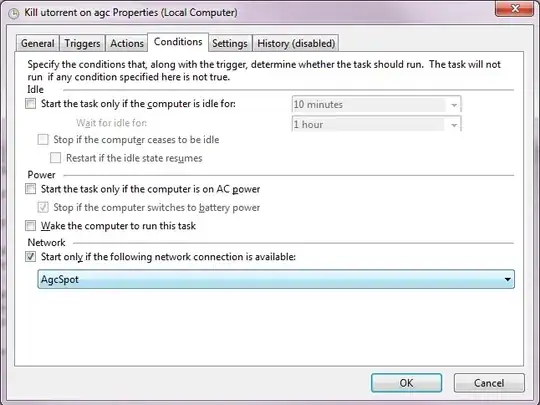
I followed the instructions on the answer to: How to launch a command on network connection/disconnection? .

Basically, I want to kill uTorrent when I connect to a specific network.

Has something changed or am I doing something wrong?

Trigger Action Start only if network is available

Menelaos
  • 186
  • 8
  • In the task scheduler, it should show if the event ran successfully, exited with an error, or didn't exit at all. Connect to the network and check to see if anything shows up for the latest run in the task scheduler. Hard to tell if it isn't triggering or if the program you're running has an error. – nhinkle Jan 22 '14 at 20:45
  • When I run the program manually (right click run task - or something similar) it works. When I connect to the network it doesn't do anything. I'm suspecting it's something with the trigger. – Menelaos Jan 22 '14 at 20:56
  • In the Event Viewer, Navigate: Applications and Service Logs -> Microsoft -> Windows -> TaskScheduler -> Operational. Look for Events with IDs of 101 (Task Start Failed), 112 (Launch condition not met), 126 (Task restarted on failure), and 108 (Task triggered on Event). These should give you a rough idea of what's going on. – jliv902 Aug 14 '14 at 15:29
  • @jliv902 I have the same problem and when I check the logs there are actually 0 events under operational – Rishav Mar 24 '19 at 19:37

2 Answers2

1

5 years later just in case you still need help.

I had the same problem. Fixed it by setting the source to Microsoft-Windows-NetworkProfile.

Read the comments on this answer https://superuser.com/a/262880/873761

Rishav
  • 123
  • 1
  • 7
1

In my case, I need to use Trigger with Custom Filter like below

  • Event Level: Information (connect & disconnect has Information level)
  • Logs: Microsoft-Windows-NetworkProfile/Operational
  • EventID: 10000
  • Keywords: Choose All keywords (The 1st option)
  • User: All user (leave default)
  • Computer: All computer (leave default)

The rests are the same as OP's

enter image description here