0

I have recently re-installed Windows 7 following a BSOD incident and I have noticed the CPU usage maxing out occasionally when I am not doing very much (not when it has recently started up). When I hear the fans going full throttle I check task manager to see what is working the computer so hard, but nothing is listed that is using more than a few % CPU, yet the overall usage is 100% (or high ninties) e.g.
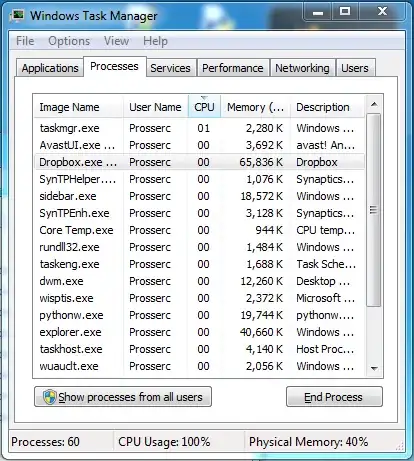
enter image description here

Does anyone have any ideas on how I can get the the bottom of what the computer is really doing when this happens?

ChrisProsser
  • 113
  • 6
  • 3
    You'll probably need to click the button that says "Show processes from all users". That should show you the offending process, at least. – user55325 Jan 05 '14 at 20:46
  • What was the reason for your previous BSOD, do you have an error code? They could be related – cutrightjm Jan 05 '14 at 21:25
  • @ekaj Sorry, I don't have the code from the BSOD, Windows crashed when I was scanning for devices (attempting to tether my laptop to my phone for a 3G connection). It crashed and would not boot into windows, so I did a re-install. – ChrisProsser Jan 05 '14 at 22:22
  • run xperf when you have the CPU issue again and provide the zipped ETL file: http://pastebin.com/pgE11HRD – magicandre1981 Jan 06 '14 at 05:10

1 Answers1

0

You could try to go to the performance tab and then click on resource monitor. Go to the CPU tab and leave it on for a few minutes and you should have your culprit.

Jabbath
  • 121
  • 2