Is it possible for now to watch live youtube video streams using vlc? I just don't want to use flash player. I know that vlc can play youtube videos using link for the page where that video is located, but how about live youtube videos?
Asked
Active
Viewed 7.8k times
27


-
I double this question. For me VLC successfully plays usual YouTube videos (non-live), but fails to play any **live** stream (e.g. from [here](//youtube.com/live)). Maybe that happens because non-live videos are available in more formats on YT (I suppose, YT automatically recodes them at the end) while live streams are in MP4 only (at least `youtube-dl --list-formats` reports the difference between playable and non-playable URLs in that way). – Sasha Jun 15 '18 at 07:21
3 Answers
13
Yes, it works the exact same way as non-live streams. Just Ctrl+N (or Media > Open Network Stream) and enter the youtube URL through the first parameter.
An example of the first thing I saw on youtube live (pretty darn terribad):
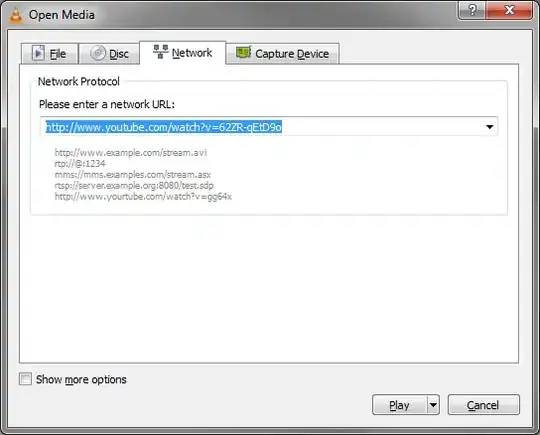
Alternative
If you are just looking to avoid using flashplayer, you could opt into YouTube's HTML5 Player.

nerdwaller
- 17,054
- 2
- 44
- 44
-
Ok, try this link http://www.youtube.com/watch?v=EH-n3Ayqctk if it works for you, because when I try vlc just crashes. – rulet Nov 22 '13 at 15:42
-
Works just fine. Try repairing your install. What OS are you on? May be a bug in other OSs or languages, not sure though. – nerdwaller Nov 22 '13 at 15:44
-
I'm using vlc 2.0.6 on Debian 7 with latest system updates. What OS and vlc version are you using? – rulet Nov 22 '13 at 15:47
-
@rulet - 1) Is it all live streams, or just that one? 2) Try running vlc from the command line and seeing what errors you get when it crashes, update your OP with them. `vlc -vvv http://youtube.com/watch?v=EH-n3Ayqctk` – nerdwaller Nov 22 '13 at 15:55
-
Here it is http://pastie.org/8501365 , last lines(the output is too long). – rulet Nov 22 '13 at 16:03
-
1
-
2Your issue doesn't stand out as obvious to me, but looking through VLC forums, seems to be an on and off issue as YouTube keeps updating their site and how it works with videos. – nerdwaller Nov 22 '13 at 16:18
-
Segfault on Rip Curl Pro YouTube live stream https://www.youtube.com/watch?v=2_BV8pCppHw (Ubuntu 13.10 x64, VLC 2.0.8). I can't even get RTMP link, any solution? – baptx Apr 20 '14 at 22:04
-
1For me VLC successfully plays non-streaming YouTube videos (like [this one](//youtube.com/watch?v=EH-n3Ayqctk)), but fails to play **streams** (like [this](//youtube.com/watch?v=w9_da7Kf0VU), [this](//youtube.com/watch?v=3Q11d6I21PE) and everything from [here](//youtube.com/live)). Yes, console shows some errors, but I have no ideas how to interpret them. Any ideas? – Sasha Jun 15 '18 at 07:13
3
There is one more solution and that is to use streamlink together with VLC: https://github.com/streamlink/streamlink
This also allows you to select the streaming quality, which is not possible if you paste the link directly into VLC.
Example command for 720p quality:
streamlink https://www.youtube.com/watch?v=xxx 720p

Casper
- 261
- 2
- 8
-1
I would like to add to the answer already given by nerdwaller.
VLC requires a CA-Certificate file to be able to validate an *http***s** connection.
I was signed into youtoube, copied the address and tried
Media --> open Network Stream --> Play
main error: TLS client plugin not available
main error: open of `https://www.youtube.com/watch?v=.....' failed
Once signed in, you are surfing using the HTTPS protocol. (So copy-paste will get ya)
Take away the s and open through a not encrypted connection and it worked fine.


Pau Coma Ramirez
- 533
- 5
- 9
-
3
-
@peetonn : This is what worked for me back then. On my vlc now 2.2.0-pre2 Weatherwax, when entering an https link, it automatically falls back to an http connection. Perhaps you could set your messages Verbosity to (2) debug to get some more info as to what is happening. Menu [Tools] --> [Messages]. – Pau Coma Ramirez Jan 28 '15 at 10:25
-
1I believe, YouTube has changed its API. if I remove "s" from https, it simply doesn't work saying that it needs TLS plugin – peetonn Jan 28 '15 at 18:48
-
@peetonn : Well thanks for letting me know that this didn't work in your case, probably it is not the real solution and was a work around back then. You could try to install `gnuTLS`. Also you could try another solution proposed as to [feed VLC with certificates](https://blog.sleeplessbeastie.eu/2010/12/31/vlc-quick-solution-for-problems-with-certificates/). – Pau Coma Ramirez Jan 29 '15 at 00:15
-
yep, checked these links already, thanks. the one with feeding certificates - I don't know how to do this in windows. also, tried GnuTLS - but they have builds for x86 architecture only. anyways, i've figured out that it's only VLC's x64 version problem. win32 (x86) actually works. in the end, I posted a question [here](http://stackoverflow.com/questions/28204837/no-tls-support-in-vlc-2-1-5-win64) – peetonn Jan 29 '15 at 06:37