-1

I am often doing some cleanup in hard drives and I always want to know the size of each Folder in a directory in Explorer.
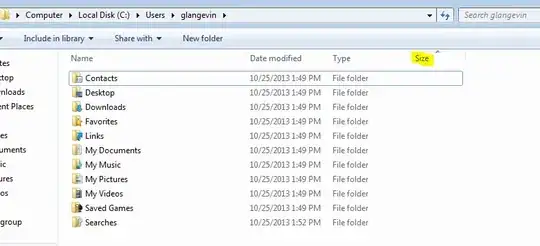
Each time i need to run a dir to know the folder size. I noticed that there is that option in windows explorer but why does the size of thoses folders is never showing up?

enter image description here

Thanks for your help

Oliver Salzburg
  • 86,445
  • 63
  • 260
  • 306
Delbane
  • 29
  • 1
  • 7
  • Related: [How can I visualize the file system usage on Windows?](http://superuser.com/questions/8248/how-can-i-visualize-the-file-system-usage-on-windows) – Ƭᴇcʜιᴇ007 Nov 05 '13 at 17:16
  • I am not talking of any third party programs I think there must be a way whitout right clicking and going into propreties for every folder to know wich one has a large size, also dont want to run a cmd command everytime – Delbane Nov 05 '13 at 18:09
  • 2
    As others have said here and in the links supplied in the question marked as a duplicate: You can't do it without a third party program. – Ƭᴇcʜιᴇ007 Nov 05 '13 at 18:34

2 Answers2

3

That is intended behavior by Microsoft. There would be to much I/O disk access. every time you open a folder it would start calculating the sizes of the folders making for slower loading of windows. Imagine it trying to calculate the Windows folder. Basically It just isn't used so the system is faster.

jmc302005
  • 731
  • 4
  • 9
1

As @jmc302005 said, this simply isn't possible, and that's intentional.

Try this, it's an excellent way to get an overview of what's eating up you're space
WinDirStat - Windows Directory Statistics

Just run and it and look for the big blocks in the treemap, then go clean them up if you can and run it again to see the impact it's had, simple :)

EDIT
I think the reason the file size column exists is because the data is available on individual files, so a folder with files and folders in it would need the column there for the individual files.

As a result it would be a waste of time (and processing power) to program the function to not provide the column if there happens to be no files in the folder, only more folders. Especially considering the fact that you could add or remove files at any time.
CLockeWork
  • 2,087
  • 1
  • 18
  • 26
  • if it's impossible then why microsoft added the funtion when you look at folders? I am also running a raid 0 of 2 samsung 840 pro I think I would have the performance to do it. The only thing I see is that this option is only there to be used when there is files in the directory. There must be a way to get this working – Delbane Nov 05 '13 at 16:23
  • Sorry, I've searched long and hard and found nothing (and been tearing my hair out asking the same questions) Hence why I use WinDirStat. Still, I’ve added an edit to my answer with what as see as the most likely reason for why this feature doesn’t show folder sizes. – CLockeWork Nov 05 '13 at 16:30
  • Really there is no need for that function to work on folders when you can just right click them and get the size. – jmc302005 Nov 05 '13 at 18:52
  • @jmc302005 If there were no need to know folder sizes there wouldn't be utilities like WinDirStat. As you said correctly, Windows would start calculating ***recursively*** the sizes of all folders in view. Now imagine what would happen if two folders are symlinked with each other... – Doktoro Reichard Nov 06 '13 at 00:45
  • Yes but when you browse explorer lets say to see wich folder is taking so much space well you have to right click every folder to know their size. There must be a way to do it in Explorer and not in CMD or powershell – Delbane Nov 06 '13 at 00:46
  • cmd and powershell are the ways. There is even a app out there that I will not link that does what you ask but it causes issues. Even noted as such by the author. – jmc302005 Nov 06 '13 at 00:49
  • @Doktoro Reichard I never said there was no need to know folder sizes. I said you can just right click and view the properties. To view a directory that is what cmd and powershell are for IMHO. – jmc302005 Nov 06 '13 at 00:52
  • Also the program you spoke of only runs one time at start up. If that function were built into File Explorer then you would have bogged down windows all the time from calculating sizes. However that does seem like a nice tool for people that don't like cmd or powershell. – jmc302005 Nov 06 '13 at 00:55
  • So I figured I would try out WinDirStat. As I figured. It took 33 minutes for it to scan my 3 discs about 3 TB. I have 8gb mem and 6core AMD processor at 3.48 GHz. It didn't lag my system it just took forever to load the information. – jmc302005 Nov 06 '13 at 01:45
  • Yeah, my drive is way, way smaller, only takes a few minutes. I guess it's good for small scale users, but if you've got a serious rig you'll need something better (Powershell is certainly the current hype in our user group) – CLockeWork Nov 06 '13 at 10:31