4

I have a strange problem with one of my PDF files. In some places (usually where the text is bold), all the letters are invisible except for the "a"'s and "v"'s. When I copy the text and paste it into another program, I can see the letters displayed normally.

For example, I see:

PDF with invisible letters

Copying and pasting the start of the paragraph into another program, I see: "The instantaneous rate of change at".

How can I fix this?

mowwwalker
  • 1,584
  • 7
  • 24
  • 41
  • Have you tried opening it in another pdf reader (especially in Acrobat Reader). Especially some mathematical expressions are not supported by all implementations. – Tim Oct 11 '13 at 07:51
  • 1
    same reason as this http://superuser.com/questions/164907/unsearchable-uncopiable-pdf-document?rq=1 – Haicim Oct 11 '13 at 12:21
  • maybe this will help (worked in my case): https://superuser.com/a/1639113/73961 – michael Apr 03 '21 at 08:56

3 Answers3

2

I suffered from the same problem and found that just changing the font to something else then back to the original font fixed the issue.

Hope this helps.

Rory
  • 21
  • 1
  • 1
    Could you elaborate? How can I change the font? Do you have any particular program (viewer, editor) in mind? Will it fix the file permanently? – Kamil Maciorowski Nov 16 '17 at 15:28
  • You need to go back to the file that was used to create the PDF. This is most likely Microsoft Word, Adobe Indesign, or some equivalent. The fonts and export settings can be changed from there. – Splambo Apr 01 '21 at 17:22
2

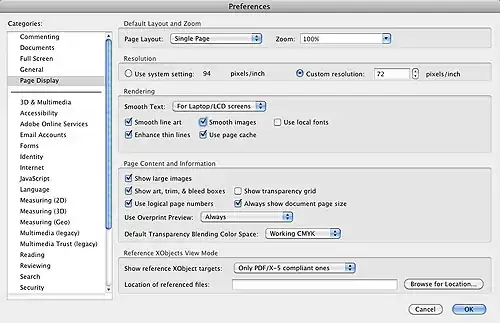
This may have to do with the embedding of restricted fonts. Try unchecking the Acrobat Preference for "Use Local Fonts" for reading, under Page Display > Rendering, as shown in the image below (or in a very similar location, depending on the version of Acrobat):

enter image description here

Debra
  • 4,268
  • 1
  • 17
  • 24
  • That didn't work – mowwwalker Oct 14 '13 at 00:48
  • Sorry to hear that. What you're left with is going to be examining the fonts used in the document, and then either installing what's missing, or forcing a substitution. There's a procedure here: http://forums.adobe.com/thread/303381 essentially "Advanced Editing > Touch-up Text tool > right-click > Properties" and replacing with a more standard font. – Debra Oct 14 '13 at 01:02
0

Please try this,

  1. Open the document with missing letters in Acrobat.

  2. Needs to be done only once: Go to menu -> View -> Tools -> Print Production (It will add Print Production to the tools set on the right)

  3. Go to Tools (on the right) -> Print Production -> Preflight (It will open a small popup window with a lot of tech info on it) Click small button “Analyze and fix” on the Preflight popup at the right bottom corner, it will ask you to save the document, you can leave the same file name. It will ask to replace – click yes.

  4. It will take a while to analyze the document and fix all conflicts with fonts, etc. And it will make PDF document slightly larger.

  5. You can inspect fixed file and close Acrobat – document should be fixed and saved.

Hope that helps. (Using Acrobat XI Pro)