I wish to save firefox addons & extenstions and install it offline, Is it possible to save the addons and install it later offline?
Asked
Active
Viewed 3.4k times

3 Answers
14
On the Firefox addon page search for your desired addon.
Download Addon
- Continue to download
- Right-Click -> Save Link As... -> save the .xpi file
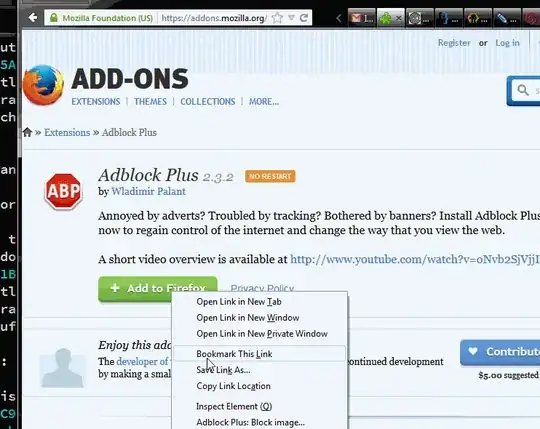
Installing Addon
Drop the addon in the adress bar.

TaXXoR
- 154
- 5
-
4pretty elegant, and dosen't need preinstalled extentions. Nice! – Journeyman Geek Sep 18 '13 at 06:00
-
unfortunately I dont know the exact term for "save as shortcut" for Firefox. Feel free to edit. – TaXXoR Sep 18 '13 at 06:03
-
3Added a screenshot – Journeyman Geek Sep 18 '13 at 06:13
-
@Journeyman wow nice work, which program have you used? – TaXXoR Sep 18 '13 at 07:47
-
[licecap](http://cockos.com/licecap/) by cockos - been itching for a chance to use this ;p – Journeyman Geek Sep 18 '13 at 09:02
2
Possible. If you need only the Add-ons to be saved & install offline, you may refer below steps. Or if you're planning to do a full backup, you can also refer Journeyman Geek's Answer.
- At the top of the Firefox window, click on the Firefox button, and
then click
Add-ons. The Add-ons Manager tab will open. - In the Add-ons Manager tab, select the
Extensionspanel. - To add the downloaded add-on to the list of available add-ons, drag and drop the file into the Add-ons window. The Add-on is added to the list.
- The installation process should begin.
That should get your work done.
Source: Mozilla Support


1
febe will do the trick - you can both back up things as a single xpi file, or individually.
I haven't used it recently so I can't remember if it backs up settings. Some folk seem to report issues backing up, but that seems to be an issue with permissions more than anytbing else. The nice thing is this is an extention, and I believe cross platform.
For windows, if you want a full backup of your mozilla firefox or thunderbird environment, or more than just xpi files, take a look at mozbackup. Its a third party bit of software that does more complete backups. Its what I use now.

Journeyman Geek
- 127,463
- 52
- 260
- 430