6

I have a file which I wrote and not thinking put the actual filename in single quotes like this:

'filename'

When I try to remove it using rm -f 'filename' it does not recognize that it is there I get the error:

rm: cannot remove 'filename'. No such file or directory.

Any suggestions?

user 99572 is fine
  • 3,397
  • 3
  • 30
  • 43
  • 3
    possible duplicate of [how to delete a file with a weird name](http://superuser.com/questions/451979/how-to-delete-a-file-with-a-weird-name), http://superuser.com/questions/229851/how-to-delete-file-with-this-name-on-linux-q, http://superuser.com/questions/540704/undeletable-file-in-redhat-linux, http://superuser.com/questions/408121/delete-or-rename-a-file-with-r-as-the-file-name – Ƭᴇcʜιᴇ007 Sep 17 '13 at 17:05

2 Answers2

10

Quote the quotes.

rm "'filename'"
Ignacio Vazquez-Abrams
  • 111,361
  • 10
  • 201
  • 247
  • If, like me you have quotes and non-ascii characters, try this: https://stackoverflow.com/a/19146768/3387223 – CodeMonkey Oct 13 '21 at 05:51
3

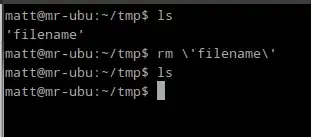
Another option (in addition to @IgnacioVasquezAbrams's) is to escape the '

rm \'filename\'

enter image description here

nerdwaller
  • 17,054
  • 2
  • 44
  • 44