15

How do I manually trigger the "turn off display" function in Windows 7? This normally happens automatically when the user doesn't move mouse or presses any keys for a certain amount of time (power management section of control panel).

Third party software or a full blown application is nice, but I'd prefer an approach native to Windows 7. Like a command line or something.

user1306322
  • 4,736
  • 14
  • 50
  • 88
  • Times below the minute for the monitor sleep option? That would help when applying this method: https://answers.microsoft.com/en-us/windows/forum/windows_7-desktop/how-can-i-turn-off-the-monitor-ie-put-it-to-sleep/0ea689fd-bc46-4329-8f2c-bf9967d18114 – Andrestand Jul 20 '17 at 12:09

4 Answers4

11

This script written in Powershell can make this work for you.

# Turn display off by calling WindowsAPI.

# SendMessage(HWND_BROADCAST,WM_SYSCOMMAND, SC_MONITORPOWER, POWER_OFF)
# HWND_BROADCAST  0xffff
# WM_SYSCOMMAND   0x0112
# SC_MONITORPOWER 0xf170
# POWER_OFF       0x0002

Add-Type -TypeDefinition '
using System;
using System.Runtime.InteropServices;

namespace Utilities {
   public static class Display
   {
      [DllImport("user32.dll", CharSet = CharSet.Auto)]
      private static extern IntPtr SendMessage(
         IntPtr hWnd,
         UInt32 Msg,
         IntPtr wParam,
         IntPtr lParam
      );

      public static void PowerOff ()
      {
         SendMessage(
            (IntPtr)0xffff, // HWND_BROADCAST
            0x0112,         // WM_SYSCOMMAND
            (IntPtr)0xf170, // SC_MONITORPOWER
            (IntPtr)0x0002  // POWER_OFF
         );
      }
   }
}
'

[Utilities.Display]::PowerOff()

Note: This tip requires PowerShell 2.0 or above.

stderr
  • 10,264
  • 2
  • 32
  • 49
  • @user1306322 Correct. Screen saver does not turn off the display. – lance Dec 19 '14 at 06:32
  • @user1306322 The answer has been updated. – stderr Dec 19 '14 at 10:53
  • For the lack of a better answer I'm accepting this one. It should be noted that this is only useful when you are not interacting with the computer. That is, in order to make the screen stay powered off, you need to stop touching any buttons or mouse. Setting up a timer for a second or two before executing this command might be of great use. – user1306322 Dec 19 '14 at 15:31
  • Setting this in a `.bat` file and double clicking does not work. Either the API has changed or either I don't know how to execute this. What's the "launch" method expected for this script? – Xavi Montero Mar 23 '20 at 01:01
8

Not native solution - requires free external program Nircmd. But it is pretty useful and takes nothing to use it.

To turn monitor off:

nircmd.exe monitor off

To turn monitor on:

nircmd.exe monitor on
VL-80
  • 4,475
  • 2
  • 28
  • 38
7

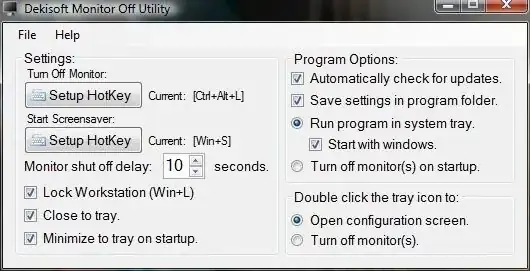
I use the Monitor Off Utility for several years. I assigned a shortcut combination and press it if I like to disable the display.

enter image description here

enter image description here

magicandre1981
  • 97,301
  • 30
  • 179
  • 245
0

Try

%SystemRoot%\System32\RUNDLL32 %SystemRoot%\System32\USER32.DLL,LockWorkStation

You may need to go into Control Panel and configure your screen saver to be “none”.

  • This only does what the `LockWorkStation` command name suggests − locks current user's session. The same effect can be achieved by pressing [Win]+[L]. – user1306322 Aug 13 '13 at 00:40
  • Did what it said, turned off screen saver and then screen turns off automatically. Great. – Tom Collinge Mar 31 '21 at 12:16