When I start Opera, I see that opera mail and rss starts up automatically. And update itself. I have slow Internet connection. To use opera (nicely) I have to wait for that (unnecessary) update to over. Please suggest me a way to stop this update at startup.
Asked
Active
Viewed 259 times

1 Answers
1
(Since you refer to Opera's mail client I assume you are using Opera 12.xx)
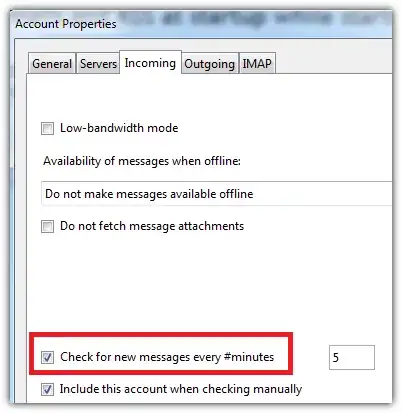
There is no way to disable mail check at startup without disabling the check for new mails in general. If you wish to disable automatic mail check at all (not only at startup), you can do the following:
- Go to
Opera → Mail and chat accounts → Select account → Edit → Incoming - Disable the option
Check for new messages every #minutes

nixda
- 26,823
- 17
- 108
- 156
-
thanks. I think there is no way to turn off RSS other than running this command in shell $ opera -nomail (this will start opera without mail client) – Himanshu Mishra Oct 04 '13 at 05:12