4

I think this might be the weirdest thing I've ever seen a computer do. It's a Windows 7 SP1 machine. When I position the arrow in the middle portion of the screen, nothing I do with the mouse, except moving, has any effect. It means that if a small dialog box pops up, in the middle of the screen, as it does, I can only communicate with it with the keyboard. What could be the cause, and what do I do to make it go away?

Update: Here are the promts mentioned in the comments. They have no business being there.
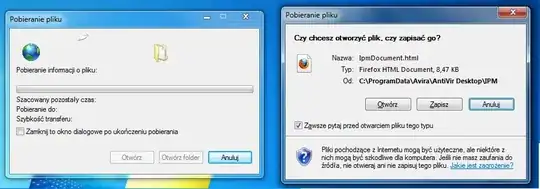
enter image description here enter image description here

First the first two pop up, right after system start. The other two pop up after the antivirus downloads the updates. The ones on the right come up on top of the ones on the left. I've dragged them using the keyboard (the mouse won't work there). The ones on the left are unresponsive. When I turn the first ones off, the problem persists. I believe the problem was gone when the second ones popped up or when I turned them off.

Update: Removing Avira removed the problem, but unfortunately installing it again makes it come back. I'll add the avira tag.

Michał Masny
  • 326
  • 3
  • 8
  • 21
  • 1
    What happens when you hit `Win + D`? Can you drag and drop an icon there and then pick it back up? It sounds like an invisible window is intercepting your mouse clicks. – Michael Frank Jul 23 '13 at 20:59
  • @Michael I can't drop an icon there. If it's an invisible window, then it's always on top. There's one more weird thing, and now I think it could be related. The computer has Avira's antivirus installed. It's supposed to display a popup window each time it updates. But it doesn't. Instead, I get download prompts asking me if I want do download some html file. I'll post a sceenshot when it happens again. The area in which the mouse doesn't work is about the size of the popup that's not there. – Michał Masny Jul 23 '13 at 21:38
  • @Michael Well, alright, if the window were on top, I guess it would intercept the keystrokes as well, and it doesn't. I'm really confused. – Michał Masny Jul 23 '13 at 21:39
  • . . . it would intercept keystrokes, only after it was the active window, assuming it would activate. I might think to test in a different windows grafics mode, areo vs classic, because the "skins" and border and grab edges are slightly different. There are utilities that will give all processes a taskbar presence (sorta unhide). If you suspect a specific program, easy enough to test that. – Psycogeek Jul 23 '13 at 21:58
  • http://www.youtube.com/watch?v=W0y0nWAje-Q (try restarting?) – Bob Jul 24 '13 at 02:17
  • 1
    You could also grab a copy of [Spy++](http://mdb-blog.blogspot.com.au/2010/11/microsoft-spy-or-spyxx-for-download.html) and use the `Find Window` function. Or use [WinSpy++](http://www.catch22.net/software/winspy-17) (easier). – Bob Jul 24 '13 at 02:40
  • @Bob restart doesn't help. – Michał Masny Jul 24 '13 at 05:49
  • @Bob Spy++ gives an error message on start, and WinSpy++ doesn't seem to be working properly (the specifications don't include Win7 which could be the cause) – Michał Masny Jul 24 '13 at 16:58
  • @ymar They most definitely support Windows 7. What was the error message? – Bob Jul 25 '13 at 03:42
  • Not exactly the same, but reminds me of http://superuser.com/questions/328657/windows-7-has-an-odd-idea-of-what-fullscreen-is – Journeyman Geek Sep 01 '13 at 11:13
  • For a permanent working solution see: https://superuser.com/questions/623333/mouse-right-click-left-click-scroll-dont-work-in-the-middle-of-the-screen/1361297#1361297 – Kr15 Sep 25 '18 at 17:09

5 Answers5

8

Obviously this is an old thread so you've probably already found the solution or a way to work around it. However, since this is one of the first google resluts for the problem, I thought I'd share my solution here anyway -for the sake of anyone else who's still looking for one.

If you experience the exact same problem as the OP (avira installed, weird download pop-ups) -kill the ipmgui.exe process and deny read/write acess to it. The unclickable part of the screen is an invisible, always-on-top ghost window created by the avira notification process.

Should you not have avira, get the Sysinternals Process Explorer and use it to identify the process. ("hold and drag the 'target' icon from procexp over to the 'ghost' window and drop it.") 'atkosd2.exe' for example, is known to cause the same issue.

@Source

Giacomo1968
  • 53,069
  • 19
  • 162
  • 212
Hopeinacup
  • 96
  • 1
  • 3
  • Thanks! In my case that window was hidden in Windows 8, I removed a process "In Product Messaging Application" (Avira), a problem disappeared. – CoolMind Jul 06 '16 at 09:06
  • Every hour after killing the process ipmgui the hidden window appears again. Some methods described in http://www.wikihow.com/Remove-the-Popup-Ads-in-Avira-Antivir haven't help, it still shows. – CoolMind Jul 06 '16 at 16:13
  • For a permanent working solution see: https://superuser.com/questions/623333/mouse-right-click-left-click-scroll-dont-work-in-the-middle-of-the-screen/1361297#1361297 – Kr15 Sep 25 '18 at 17:09
1

Today the same problem came up on my Win7-SP1 PC. I never had it before although using Avira since years. With Process Explorer I found out that the mysterious window is from the process "c:\Program Files\Avira\Launcher\Avira.ServiceHost.exe". After killing it the problem persisted. Next Process Explorer found ipmgui.exe (C:\program files\Avira\antivir desktop\ipmgui.exe). Killing this process also removed the problem.

Hoping Avira will solve this soon.

huha
  • 193
  • 9
  • This duplicates another answer and adds no new content. Please don't post an answer unless you actually have something new to contribute. – DavidPostill Jun 06 '16 at 21:46
  • For a permanent working solution see: https://superuser.com/questions/623333/mouse-right-click-left-click-scroll-dont-work-in-the-middle-of-the-screen/1361297#1361297 – Kr15 Sep 25 '18 at 17:09
1

It can be an invisible window stuck on any particular part of the screen.

In my case, it was on a right-hand side. It was a Chat notification from Slack Windows app which was invisible.

To close that window, a very simple way is to just click on Windows Button + Tabs Button or ALT Button + Tabs Button.

When you click these buttons, it will show you all open windows.

Press Tabs button Holding Windows Button and go to that window which is invisible, but you can see this way.

After opening that window, press ALT Button + F4. This will close that window and you will be able to use that particular area also.

0

FWIW - Brother Printer Status Monitor causes the same problem. An open window, always on top, and hidden, which intercepts all the mouse clicks.

I open the Task Manager and end the process, and my mouse works properly again.

Jay
  • 1
0

Even if this is an older question there are still many users running Avira free antivirus and the ipmgui.exe-problem is really annoying.

Because regardless of setting up a windows firewall rule for ipmgui.exe the process will be started periodically i found it is a perfectly working solution to install Bill2´s Process Manager (https://www.bill2-software.com/processmanager/download-en.shtml) and there you can easily create a rule for ipmgui.exe to kill the process swiftly when it´s started. Additionally you can configure a tooltip to be shown in systray when this happens and you can see statistics for process executions and much more.

Kr15
  • 565
  • 1
  • 3
  • 14
  • Feel free to donate, and no i´m not Bill or the one who created this practical piece of software. Btw, thanks Bill (or whoever developed the tool)! – Kr15 Sep 25 '18 at 17:06