1

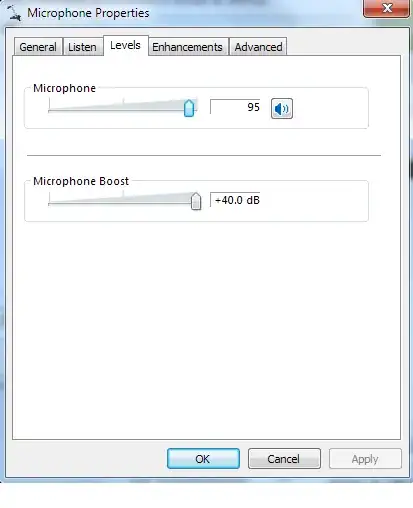
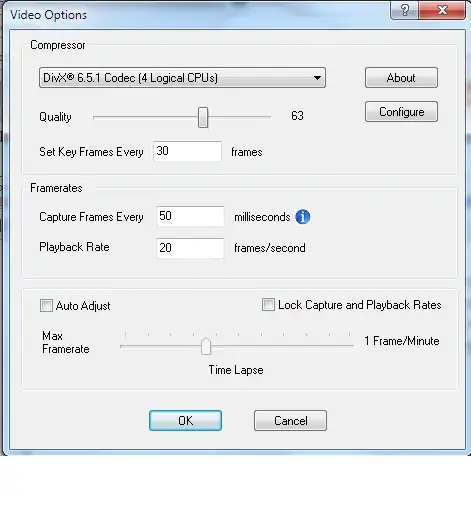
I can record a video and capture audio just fine, but when I play it back, there is something like white noise in the background, you can barely hear my voice, and it certainly isn't clear enough to understand what I am saying. I have posted the settings I am currently using below. My recordings can either be .avi or .swf. I am currently using Windows 7, but I would like it to work on XP as well.

Obviously it would be nice to keep the file size as small as possible, but I really just want it to work right now.
Audio Settings

Video Settings

Mic Settings

Jeremy Lin
  • 477
  • 1
  • 6
  • 9
  • You should first try to rule out whether Cam Studio is the problem. Can you voice record in another application without problems? – dtmland Jul 11 '13 at 16:09
  • 1
    Good call. It was indeed working on other applications before, but apparently I accidentally hit the mute switch since the last time I used the mic – Jeremy Lin Jul 11 '13 at 16:33

1 Answers1

1

From your description it sounds as if you have the initial recording volume set too low. Check your audio chain and record at as high a level as you can without distortion.

Xavierjazz
  • 8,160
  • 13
  • 68
  • 96
  • 2
    You were basically right. Actually there was a mute switch on the headset that was causing the problem. Whoops. – Jeremy Lin Jul 11 '13 at 16:28