-1

I recently noticed that my hard drive is nearly out of space. I have an Intel x25 80Gb SSD which is only used for Windows and a few programs. I have 1Tb & 2 Tb data drives which are used for storing files and most programs. I thought maybe I had saved something large to the SSD accidentally and searched of it, but I can not find anything.

Disk management reports the SSD as 74.43Gb, so the space is entirely allocated to the partition, and not missing as unallocated.

I checked the properties of the SSD, and it reports 65.1 Gb with 9.3 Gb free, but when selecting all the files on the SSD (including hidden files) and check the properties, they only sum up to 30.2 Gb. This leaves 34.9 Gb unaccounted for.

killermist
  • 1,929
  • 1
  • 17
  • 33
  • 1
    How much space is allocated to restore points or shadow backups? – Hennes Jun 04 '13 at 10:41
  • 1.Try clean the system using `CCleaner` or `cleanmgr` Windows. 2. Delete the `system restore points` (except the `last` one for safety). – stderr Jun 04 '13 at 12:56
  • 1
    Also http://superuser.com/questions/22595/whats-using-up-my-disk-space http://blog.superuser.com/2011/05/07/where-did-all-my-hard-drive-space-go/ – Oliver Salzburg Jun 04 '13 at 14:06

2 Answers2

1

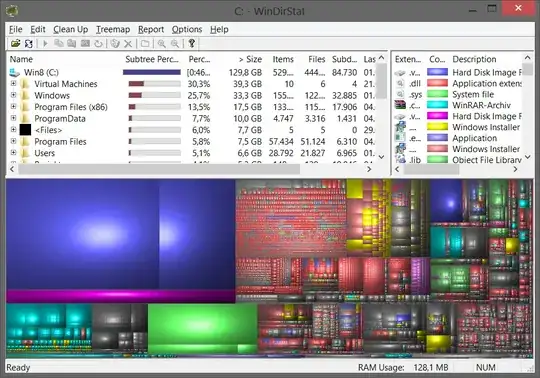
Maybe WinDirStat is able to show you which files consume your disk space. Probably there's some system folder Windows ignores when right clicking the files in C:\ (e.g. %WinDir%\WinSxS).

enter image description here

Gene
  • 1,590
  • 2
  • 16
  • 21
0

Hi It's probably the hybernate file and pagefile that takes up some of your space.

In File Explorer select "View->Options", Select "View" tab and uncheck "Hide Protected..."

The try and browse the root of the c-drive again.