0

I don't understand why these software do not automatically detect your speaker system and use that or assume 5.1 as default. I imagine most people have 5, 6 or 7.1.

In the very least, is there a way to configure them automatically via presets, etc? Because the settings seem obscure to me and I am not sure how to set them so that they play mkv files using the all available channels in my 5.1.

Any ideas?

Karan
  • 55,947
  • 20
  • 119
  • 191
Joan Venge
  • 1,444
  • 9
  • 25
  • 38
  • Does other applications use the 5.1? When you run Windows sound tests, does it play through all speakers? Does the file include surround-sound capable audio, or is it stereo only? – Kruug May 02 '13 at 22:06
  • Actually I don't use other applications but these are bluray files so they all have DTS audio, or AC3 in some cases. I can inspect them using mkvmerge. I haven't checked my windows setup as I just did a fresh install but it says S/PDIF. – Joan Venge May 02 '13 at 22:22

1 Answers1

1
  • For VLC see this question.

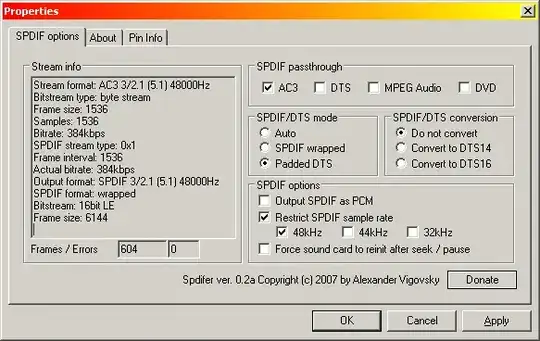
  • For MPC-HC install Spdifer:

    1

    It should be used by all DirectShow based players automatically, although for MPC-HC some slight tweaking of the internal decoder settings may be required as the page states.

  • For KMPlayer I'm not sure, but according to a post on its forum the relevant settings can be found under:

    Options / Audio Processing / Resample/Output / Speakers
    Options / Filter Control / Decoder Usage / Internal Audio Decoder / Speakers
    
Karan
  • 55,947
  • 20
  • 119
  • 191