I have a problem that is very similar to this one, but unlike it, the problem is not on a Tablet PC, and consequently not when turning to Portrait Mode. It also does not specify an error in the "d3d9.dll" module, as does the error explained in the other question.
Sometimes the error occurs after skipping to the next picture, sometimes it happens after several pictures. To the best of my knowledge, all my graphic drivers are updated. I have also tried the answers there, all to no avail.
Can anyone help me solve this problem?
Asked
Active
Viewed 8,137 times
4


-
download this reg file from my SkyDrive: http://cid-128fc518635be2dc.office.live.com/self.aspx/.Public/MS%20Foren/Registry/WER%5E_dllhost.exe.reg and make a double click on the file to import it. When the DLLHost.exe (COM surrogate) crashes, Windows Error Reporting Service [1] creates a dmp file under C:\Localdumps. Please upload the dump file as zip (skydrive, dropbox). I'll take a look at the dump with WinDbg. – magicandre1981 Mar 12 '13 at 19:19
-
1[Here](https://www.dropbox.com/s/vrge6ptwvse216u/dllhost.exe.5212.dmp) it is. BTW, the modifications your file made on my registry are ok to keep? or should I reverse it somehow? if the latter, how? Thanks. – JNat Mar 12 '13 at 21:06
-
This https://nolar.info/com-surrogate-has-stopped-working-in-windows-photo-viewer/ can may be help. – Lucky Feb 28 '17 at 12:46
2 Answers
2
The dump points to your Intel graphic card driver as source:
Call Site
ntdll!NtWaitForMultipleObjects
KERNELBASE!WaitForMultipleObjectsEx
kernel32!WaitForMultipleObjectsExImplementation
kernel32!WerpReportFaultInternal
kernel32!WerpReportFault
kernel32!BasepReportFault
kernel32!UnhandledExceptionFilter
ntdll!LdrpLogFatalUserCallbackException
ntdll!KiUserCallbackDispatcherHandler
ntdll!RtlpExecuteHandlerForException
ntdll!RtlDispatchException
ntdll!KiUserExceptionDispatch
igdumd64
0x0
0x0

SYMBOL_NAME:  igdumd64+30eb06

FOLLOWUP_NAME:  igfx-gpu

MODULE_NAME: igdumd64

IMAGE_NAME:  igdumd64.dll

DEBUG_FLR_IMAGE_TIMESTAMP:  4f3aac44

FAILURE_BUCKET_ID:  NULL_CLASS_PTR_READ_c0000005_igdumd64.dll!Unknown

BUCKET_ID:  X64_APPLICATION_FAULT_NULL_CLASS_PTR_READ_igdumd64+30eb06

WATSON_STAGEONE_URL:  http://watson.microsoft.com/StageOne/dllhost_exe/6_1_7600_16385/4a5bca54/igdumd64_dll/8_15_10_2653/4f3aac44/c0000005/0030eb06.htm?Retriage=1

Loaded symbol image file: igdumd64.dll
Image path: C:\Windows\System32\igdumd64.dll
Image name: igdumd64.dll
Timestamp:        Tue Feb 14 19:47:32 2012
So update the driver please. If this doesn't fix it, try to install the Photo Gallary from the Live Essentials and look if this fixes it.
To stop dump creation, delete the key dllhost.exe under HKEY_LOCAL_MACHINE\SOFTWARE\Microsoft\Windows\Windows Error Reporting\LocalDumps.

magicandre1981
- 97,301
- 30
- 179
- 245
-
Updating the drivers has, seemingly, fixed the problem. In case it comes back, I'll come back here. Thank you! – JNat Mar 13 '13 at 10:45
-
_Note_: Windows Essentials 2012 suite reached end of support on January 10, 2017. It is no longer available for download. – Lucky Feb 28 '17 at 12:37
0
try adding explorer.exe in DEP may be that can help. Steps for adding explorer.exe to DEP are
Firstly go to Run and type SYSDM.CPL then click on advance system settings from the left side of the screen then
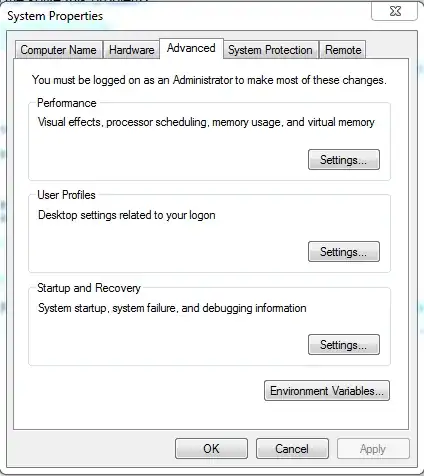
then go to data execution protection 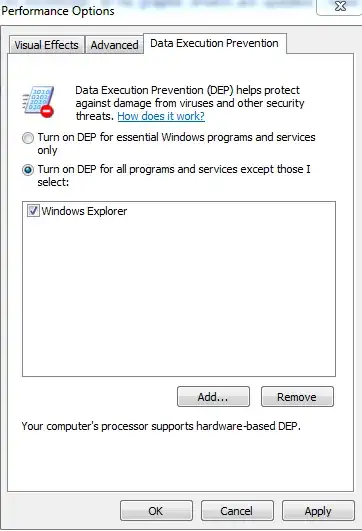
then add windows explorer from the windows folder from your root drive.
Hope that will work for you.

Rohit
- 120
- 1
- 10
-
When I try to add explorer.exe, it tells me that I cannot add 64-bit programs. – JNat Mar 12 '13 at 19:04
-
am sorry it was dllhost.exe . Add dllhost.exe to the list. And then Click Start. In the Search Box type CMD Right click on the Command Prompt icon. Click Run as Administrator. In the Command Prompt black window type: regsvr32 %windir%/System32/vbscript.dll and hit Enter. The system will return with the following message: DLL Register Server in C:\Windows\System32/vbscript.dll has been successful. Now click Start. Click Computer on the right. Click Folder and Search. Click the View tab. Tick Always show icons never thumbnails. – Rohit Mar 12 '13 at 19:22
-
Downvote. Please don't turn off DEP for `dllhost.exe`, its like telling windows to run any code including virus. Read this, _Although this may be a fix, I really suggest you don't use this method. The dllhost.exe is an executable that runs a crapload of DLLs, both Microsoft-DLLs and Third-party DLLs. It's like telling your virusscanner to exclude *.exe from scanning._ So extremely not recommended choice for solution. – Lucky Feb 28 '17 at 12:42