1

I just installed win8. Everything was fine before this, and is now. But now, this dialogue box keeps popping up in the foreground of my windows - Meaning that I've had to minimize it about 10 times just writing this paragraph. Clicking OK does nothing and just brings it up again:
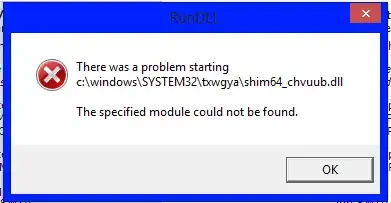
messageBox

This is its icon:

icon

Jon
  • 9,181
  • 39
  • 95
  • 127
  • 1
    Er, maybe you should start an on-demand scanner, and scan that DLL, and if it shows up as a virus, scan your system. That name looks highly suspicious. – BenjiWiebe Feb 06 '13 at 03:53

1 Answers1

4

I hate to say it, but this looks like a system compromize. Checking Bing for "shim64 dll error on Windows 8" turns up tons of posts that all involve this filename... except that the directory and the suffix of the filename (_chvuub in your case) are always different sequences of apparently random letters - a classic virus/malware tactic to hinder identification. I strongly recommend a system scan and - if easy - a complete reinstall of Windows 8 from a fresh, trusted source.

K.A.Monica
  • 6,423
  • 2
  • 15
  • 34
  • Huh... Well I guess I did have a virus after all! Thanks. Re-installing. – Jon Feb 06 '13 at 03:56
  • It would be worth a try, though, if the OP would scan and repair his computer with several scanners, and see if that fixed it. I have had virus problems, but I have always been able to fix them without reinstalling. – BenjiWiebe Feb 06 '13 at 03:56
  • 1
    @chipperyman573 Maybe you could do a refresh? That would probably fix it. – BenjiWiebe Feb 06 '13 at 03:57
  • You can always upload the dll to virustotal and see what it thinks of it. – SecurityMatt Feb 06 '13 at 05:58