4

I'd like to hide the taskbar entry to maximize effective space since the app has a systray icon, I don't need the taskbar entry. The app doesn't allow you to only have a systray instead of both.

How can I hide a taskbar entry but keep the window form?

Mokubai
  • 89,133
  • 25
  • 207
  • 233
FLX
  • 319
  • 5
  • 16
  • Can you please tell which application is that ? – ukanth Oct 12 '09 at 14:01
  • http://stackoverflow.com/questions/1553923/how-to-hide-a-taskbar-entry-but-keep-the-window-form – joe Oct 12 '09 at 14:03
  • 1
    Can you please tell why did you ask same question in stack overflow and super user and ( some other places too ) . What you are really looking for ? – joe Oct 12 '09 at 14:05
  • I was misunderstood about the concept of stackoverflow, its for developers, not end users. Andrejs Cainikovs suggested to post here instead. @UK, the app is foobar2000, which spawn a systray and taskbar entry. – FLX Oct 12 '09 at 14:11
  • Unfortunately I think your need for app being maximized & no task-bar entry can only be satisfied programmatically by the developer. But if you need space, you can hide the windows task-bar itself (i.e. make it auto-hide.) – Ganesh R. Oct 12 '09 at 16:14
  • "Please don't use signatures or taglines in your posts." - http://superuser.com/faq – Hello71 Jul 24 '10 at 16:44
  • Not what you're looking for, but you'd notice that if you move the taskbar to the far left, you can fit far more things on, and the taskbar items can be just icons. Also, less useful, with taskbar on bottom, there is a registry setting to make taskbar items smaller. But from what i've tried, not as small as when it's on the far left. – barlop Nov 03 '10 at 22:07
  • Sadly, the requirements for a window to have a taskbar button are [pretty convoluted](http://stackoverflow.com/questions/2262726/determining-if-a-window-has-a-taskbar-button), which is why such a basic function has few, if any, working programs that perform it. – Synetech Aug 09 '11 at 06:32

6 Answers6

0

Process Manager for Windows may have what you need: https://sourceforge.net/projects/processpriority/

Albin
  • 9,307
  • 11
  • 50
  • 89
boot13
  • 5,819
  • 3
  • 28
  • 42
  • I didn't find a way to do this in Process Manager for Windows. Most minize to tray applications will hide the window when moving to tray. – Deckard Nov 29 '14 at 17:50
  • @Deckard: works for me. Start Notepad. Left-click the icon in the top left corner of the window to display the system menu. Select 'Minimize to Tray'. Note that some applications have special behaviour in relation to the system tray, so this may not always work as expected. – boot13 Nov 29 '14 at 23:38
  • Seems this software can only remove the taskbar icon by minimizing/hiding the application window (Win7) – Albin Jul 25 '18 at 20:21
0

If it is a .NET application, you could use Hawkeye to change the properties of the application's main form (System.Windows.Forms.Form.ShowInTaskbar=false) while the application is running to hide the task bar entry. This is more of a temporary workaround than a permanent solution because you would need to do this every time you start the application.

Kevin Kibler
  • 101
  • 3
0

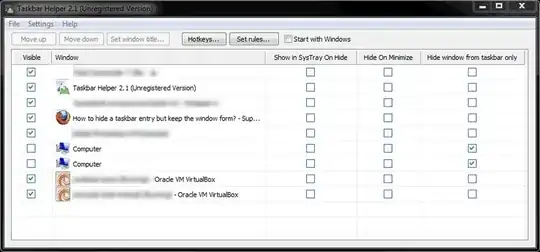
Taskbar Helper 2.1 has done the job for me. http://autoscreenshotmaker.com/minimize-to-system-tray.html

is shareware, round 15usd :( don't know how long the evaluation time is.

but the eval version works for me, just set the windows to invisible by unchecking the "visible" checkbox and also check the "hide window from taskbar only". then the windows are accessible and not visible on the taskbar.

Taskbar Helper Settings

c33s
  • 121
  • 4
0

Perhaps minimizing the app with an external Tool like TrayIt or similar will be what you are looking for.

brandstaetter
  • 4,573
  • 2
  • 22
  • 20
  • This tool makes it in system tray, but also minimizes it. I would like to keep the app open and maximized, just no taskbar entry for it. – FLX Oct 12 '09 at 14:16
  • Ah, I see. I misunderstood your question. As mentioned elsewhere, perhaps contacting the developer and requesting this feature could work for you. – brandstaetter Oct 13 '09 at 07:01
0

I don't know how to do it manually. But this program claims to do what you want:

Taskbar Button Manager is a simple utility that helps you arrange the buttons on your Windows taskbar in any way you want by using drag and drop. Moving your task buttons is very easy, no hotkey needed. In addition to drag and drop you can also use a special program window for moving the taskbar buttons. You can hide running programs too, so they don't show on your taskbar. The program works in all situations – even when the taskbar buttons are grouped or when the taskbar is not located in the standard bottom area of the screen.

A Dwarf
  • 18,981
  • 2
  • 44
  • 66
  • Hi, sadly this tool does not work – FLX Oct 12 '09 at 14:15
  • I'm not sure why. It's being referenced on many download sites and voted up (for instance, http://download.cnet.com/Taskbar-Button-Manager/3000-2072_4-10553731.html#rateit). I don't have XP anymore, so I can't investigate what the problem is. But you do need to register to be able to use it. – A Dwarf Oct 12 '09 at 14:24
  • Maybe it has todo with the fact that I'm using litestep as shell, this shouldnt be a problem though. – FLX Oct 12 '09 at 14:28
  • win7x64: this tool don't work for me (for hide option) – c33s Sep 29 '11 at 23:37
0

I've searched for this many times before, too. The closest I got was Trayer, which claims as one if its features:

the ability to remove the Taskbar button of the target application completely.

but I could never get it to work. If you can, let me know.

wfaulk
  • 6,200
  • 5
  • 34
  • 45