54

My ISP has a bad habit of putting every page I visit into an iframe so they can overlay it with their commercials etc.. (I'm guessing they are using a transparent proxy to do it)

Is there an add-on that can remove the frames or block the attempt to do so?

Something like AdBlock does not work in this case.

n611x007
  • 6,336
  • 14
  • 61
  • 88
TimothyP
  • 1,003
  • 2
  • 12
  • 22
  • 17
    What ISP do you have? And are you _sure_ it's the ISP doing this? That sounds very sketchy, and I wonder if you might have a virus that's doing this. I'm not aware of any ISP except for a handful of free dialup providers that do this. – nhinkle Jan 28 '13 at 03:12
  • 7
    It's the ISP alright :-) As soon as I enable VPN I don't have the problem. Problem is the same on Windows, Android, WinRT (surface), iOS, Linux... I'm in China... It's pretty common here. StackOverflow/Superuser even informs me that I'm framed, and then removes the frame. – TimothyP Jan 28 '13 at 03:41
  • Ahh. I see. When SO removes the frame, does the frame come back or does it go away? And why does your ISP suck? :P – nhinkle Jan 28 '13 at 04:41
  • 34
    Because this is China, they want to monitor and block everything – TimothyP Jan 28 '13 at 06:22
  • 2
    When I was using the wifi at a hotel recently (in China, but maybe that's just coincidental), occasionally pages would appear framed; the top frame was 25 pixels or so tall and told me how many days, hours, and minutes of wifi service I had left. There was an "X" icon to "close" the frame, but it would just reappear some minutes later. Quite annoying. – Garrett Albright Jan 28 '13 at 07:35
  • 3
    If possible, go to another ISP ASAP. –  Jan 28 '13 at 09:14
  • 13
    For best results, live and work in a different country. – Michael Butler Jan 28 '13 at 20:21
  • Yes, something *like* AdBlock will work, just not AdBlock itself. – Kaz Jan 28 '13 at 22:35
  • Have you tried the Google DNS: 8.8.8.8 and 8.8.4.4? – Lenik Jan 30 '13 at 02:03
  • @XièJìléi omg... apparently those are not blocked anymore... that's just weird... Of course that won't change the fact that the frame me, but it does improve the overall speed of my connection. thnx – TimothyP Jan 30 '13 at 05:45
  • @MichaelButler thnx for stating the obvious :) – TimothyP Jan 30 '13 at 07:16
  • @TimothyP I know it’s unrealted, but in those times of net neutrality fears, I need to site an example instead of just claiming. Despite, this can you give the exact ɪꜱᴘ name and offer ? Even privately in order to not change your social credit score ? – user2284570 Jul 05 '18 at 17:24
  • @MichaelButler you should rather admit most of the world population choose to stay in that situation. I don’t think moving is the right solution for every problems. – user2284570 Jul 05 '18 at 17:25
  • @TimothyP I know it’s unrealted, but in those times of net neutrality fears, I need to site an example instead of just claiming. Despite, this can you give the exact ɪꜱᴘ name and offer ? Even privately in order to not change your 社會信用體系 ? – user2284570 Jul 05 '18 at 17:33

4 Answers4

52

If the frame-busting code on Stack Exchange sites is working for you, then you could write a userscript to insert frame-busting code on every site. If you've never made a userscript before, here are some resources to get started:

There's a good Stack Overflow thread on frame busting and frame-bust-buster-busting. You could theoretically take some of the code from the answers on the SO post and inject them into every page using a userscript.

nhinkle
  • 37,198
  • 36
  • 140
  • 177
37

Vote with your wallet and don't use ISP that does this garbage.

If that's not possible, your next best bet would be to hide all the traffic from your ISP so that they can't see inside and consequently modify it. You can accomplish this by encrypting all/as much as possible of your traffic.

You can do that with browser addons like HTTPS Everywhere. It has a large list of websites to which this addon forces HTTPS connection. Also make sure your browser has SPDY protocol enabled. As part of SPDY spec, all connections are encrypted.

To go one step further, consider using some VPN service. That will make content of your traffic totally hidden to your ISP and will prevent such content modification.

Mxx
  • 2,791
  • 2
  • 19
  • 35
  • 4
    We use VPN as much as possible, but they actively scan and block it. Right now OpenVPN has been rendered useless and PPTP connections... well we're lucky if they can stay up for 10 minutes. We're looking into changing providers... but there's a big chance that won't do us any good, privacy isn't something that is respected in China – TimothyP Jan 28 '13 at 06:21
  • If they are blocking openvpn and pptp, there's still ipsec. You can also setup vpn-like connection using SSH protocol. One more thing to consider is to do all your browsing from outside of China by using some sort of Remote Desktop connection. It will be slower, but at least they won't spy on you.. – Mxx Jan 28 '13 at 06:28
  • Thnx @Mxx, we do rotate between all these methods, no other option really. It's just that if there had been an easy way to prevent them from hijacking the browser that would have been nice for those situation when we can't connect. We'll change provider soon as this is a startup and I think they have a small number of customers so nothing better to do than to show what good citizens they are and kill connections like it's a game :) – TimothyP Jan 28 '13 at 06:34
  • 10
    Is getting the hell out of the PRC an option? I don't see how any person who makes a living in tech could really work there without it feeling like one hand was tied behind their back. Are they still blocking GitHub? They started that garbage right in the middle of my trip there… – Garrett Albright Jan 28 '13 at 07:38
  • 4
    Hey, Github works without issues. What can I say... went to China a few years back for work, met a girl, got married, etc... but that's not for S.U. :p – TimothyP Jan 28 '13 at 13:04
  • 3
    @TimothyP Not to FUD, but are you *quite sure* that Github is [working exactly the way you think it is](http://news.ycombinator.com/item?id=5124784)? – kojiro Jan 29 '13 at 01:40
  • @kojiro I would have to check that :p – TimothyP Jan 29 '13 at 02:19
16

If your ISP is doing this by injecting JavaScript sourced from a specific domain, you could use a JavaScript blacklist extension to avoid running any JavaScript from that domain. (One of the public hotspots I connect to uses this approach.) However, if your ISP injects the entire script directly, then I don't think this will work.

Chrome: JavaScript Blacklist

Firefox: YesScript

You should also be able to use ad blocking extensions to block JavaScript. The most popular ones support custom filter lists, and it should be pretty easy to add an extra filter pattern to catch the framing code. If you're already running an ad blocker anyway, this might be the most sensible approach.

jjlin
  • 15,462
  • 4
  • 51
  • 51
  • I'll try and figure out what they are doing exactly first – TimothyP Jan 28 '13 at 06:29
  • 4
    It would be helpful to get a full HTML dump from a page that gets framed. View-source on the page holding the frame would be instructive. – nhinkle Jan 28 '13 at 06:51
  • @jjlin if web pages are displayed Inside iframes, I’m unsure what blocking Javascript completely would provide. – user2284570 Jul 05 '18 at 17:23
  • @user2284570 As the first sentence says, "**If** your ISP is doing this by injecting Javascript sourced from a specific domain..." But these days, it's probably simpler just to go through a VPN or HTTPS proxy. – jjlin Jul 05 '18 at 21:48
  • @jjlin easier to say than to do : 社會信用體系. Not sure using a ᴠᴘɴ is a bad cast… – user2284570 Jul 06 '18 at 03:31
15

Besides the frame busting trick, I would suggest getting the IPs of the servers that serve the framed pages and block them. If you are using China Telecom like me, they don't always frame the pages and, when they do so, a simple reload will give you the un-framed page. I guess they cannot frame everything since hijacking millions of connections per minute would bring down their resources quickly.

So what I ended up doing is to block all these IPs so I get a clean connection error when they try to mess with the current request. Then I know I can reload to get the real page. An added advantage of this method is that you don't send these servers any information, while for the frame-busting trick, the request still goes there (and given the crap they send back, I wouldn't trust them with the sensitive info that might end up in their logs).

For information here the IPs I've currently collected and blocked:
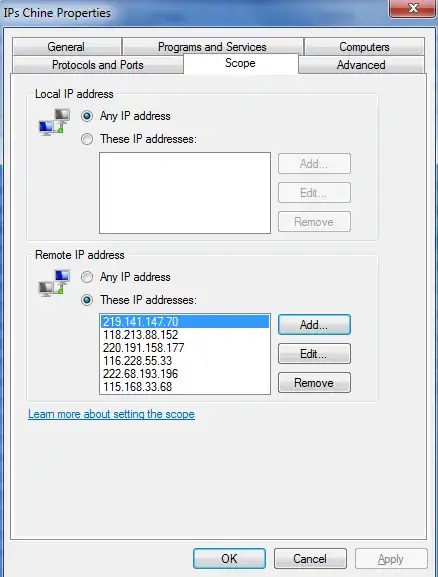
enter image description here

laurent
  • 5,979
  • 17
  • 47
  • 71