Possible Duplicate:
How to create a desktop shortcut to a Windows 8 Modern UI app?
How do you start a Windows 8 (used to be "Metro") app from the desktop (not the start screen) through a shortcut or something else?
Thanks in advance.
Possible Duplicate:
How to create a desktop shortcut to a Windows 8 Modern UI app?
How do you start a Windows 8 (used to be "Metro") app from the desktop (not the start screen) through a shortcut or something else?
Thanks in advance.
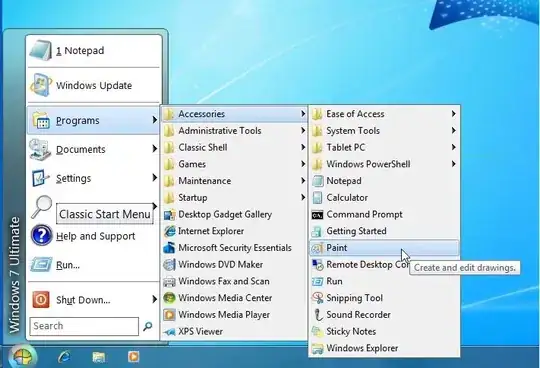
One of the easiest ways is to install a start menu alternative eg Classic Shell
http://classicshell.sourceforge.net/
This will provide you with a start menu, similar to previous versions of Windows
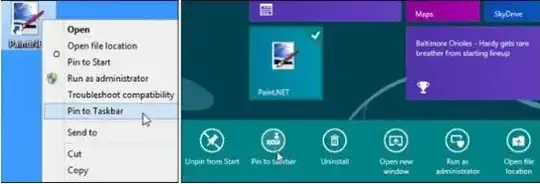
You can also pin applications to the taskbar, as with Windows 7 you can right click on any shortcut or tile for a desktop app and select Pin to Taskbar.
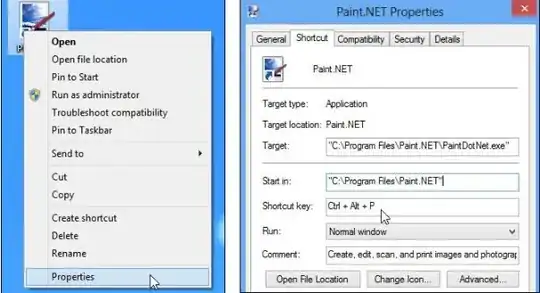
You can also create keyboard shortcuts. The fastest way to launch any program is to assign it to a Ctrl + Alt + Key combination. To assign a keyboard shortcut, you must right click on a shortcut, select properties and then fill in the Shortcut key field under the Shortcut tab.
If a desktop app doesn’t have a shortcut visible on the desktop, you must find it on the Start screen or in search, right click and select Open File Location. You will then see a shortcut icon for it appear in Explorer.
These are the ways I am aware to access programs from the desktop in Windows 8, there maybe others.