7

Webpages in Google Chrome do not load correctly from time to time. I can't reproduce it, it just happens. Some times it happens when I load the browser other times it happens when I am just browsing.

Just now I went to five different web sites which 3 out of 5 of them did not load correctly. I have attached a photo of how Super User loaded the first time I loaded it. If I refreshed it it will load correctly. Facebook is bad like this. Some times Facebook will load correctly but some of there back end scripting may not load so the page may not refresh automatically.

Not sure what is going on. I have tried other browsers (Firefox and Internet Explorer) and they seem to be working correctly. Chrome seems to be acting up only on this computer. All my computers are running Windows 8 and I have removed Chrome completely off this computer and re-installed. I even disabled all extensions and cleared all the caches. I even tried running Chrome without being logged in. Not sure what else to do at this point.

Extensions being used:

  • Facebook Photo Zoom
  • Google Mail Checker
  • MightyText
  • Downloads

I have disabled all my extensions with no luck. I use all the extensions across all my computers and only one is having an issue.

An example of superuser.com not loading correctly:
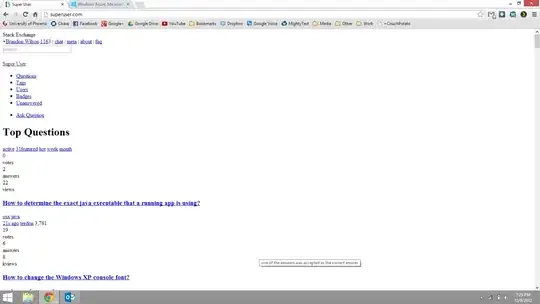
superuser on chrome

When I refresh the problem will go away until it happens again. Sometimes it takes two or three refreshes in order for it to correctly load.
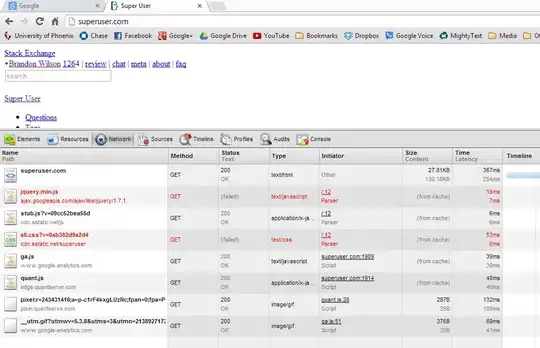
This is the updated with network detail.

ale
  • 3,369
  • 6
  • 40
  • 52
Brandon Wilson
  • 268
  • 3
  • 4
  • 15
  • If you refresh, does the problem go away? – jmort253 Dec 10 '12 at 02:53
  • Yes the problem will go away until it happens again. Some times it take two or three refreshes in order for it to correctly load. – Brandon Wilson Dec 10 '12 at 03:00
  • 3
    When it happens, before reloading, right click and click Inspect, then open your network tab and refresh. You'll then see the requests to the server to get the CSS stylesheets for the website. You can add a screenshot of any errors you see to your question as an [edit]. – jmort253 Dec 10 '12 at 03:02
  • Yes, it does appear that some stylesheets aren't being read. Could you also edit your question to include the extensions you are using? It's possible that some rule in an adblocker, for example, is causing the problem. One relatively easy way to confirm this is to visit the relevant sites after turning off all extensions. If you get relief, then turn on extensions one by one, if you have a manageable number, to isolate the problematic extension. –  Dec 10 '12 at 04:55
  • Updated, I will try the inspector today to see what is not being loaded. – Brandon Wilson Dec 10 '12 at 11:22
  • Are you behind a proxy? – Ali Dec 10 '12 at 11:32
  • No proxy, wouldn't this affect my other computers? – Brandon Wilson Dec 10 '12 at 14:06
  • I have added the image about network detail. – Brandon Wilson Dec 11 '12 at 01:58
  • Has creating a new profile fixed your problem? I have exactly the same issue. I'm wondering if is caused by a driver or a fault with the laptop. I have a Samsung Series 7 Chronos. –  Dec 19 '12 at 17:24
  • Yes I ended up creating another Chrome profile in settings and then deleting the old one and syncing up Google again. I have been using it for a few days now and it seems to be ok. – Brandon Wilson Dec 20 '12 at 00:06
  • I have this exact same problem, no extensions in chrome. In fact I had to refresh this very page 5 times to get the javascript to load just so I could post this comment. Chrome has some bugs. First load only loaded the html. Second load loaded html and css but not javascript. Load #5 finally got everything. Force refresh made no difference. – mopsyd May 11 '15 at 17:01

4 Answers4

2

Created another Chrome profile and synced my Google account account. So far so good.

Brandon Wilson
  • 268
  • 3
  • 4
  • 15
1

The solution for me was disabling a malware programme (IObit Malware Fighter).

That sorted the problem.

random
  • 14,638
  • 9
  • 54
  • 58
BDGuide
  • 11
  • 1
0

Thanks everyone for this. I've been having the same, worsening problem - lots of pages requiring multiple reloads in order to display properly, plus lots of videos not displaying. The latter made me think it was a Flash issue, so I updated my player, but to no avail. I then cleared the cache, disabled my malware (per the above), restarted Chrome and checked my extensions, but nah, nothing worked.

In the end what did the trick was updating to the ultra-latest Chrome version, in which I guess the glitches were ironed out. Interesting, even force-quitting wouldn't let me quit Chrome on the obligatory re-start, so I had to force-shut down my entire Mac - a fact which speaks of a deeper Chrome malfunction. Anyway, I then re-started successfully and all is gravy so far. Hope this is helpful to someone.

Kamil Maciorowski
  • 69,815
  • 22
  • 136
  • 202
  • Please [edit] your answer and tell us what "ultra-latest Chrome version" you refer to. The issue may return in future versions; this would make your answer hardly useful unless you gave us the exact version number. – Kamil Maciorowski May 01 '18 at 09:16
-1

I had this same problem. After clearing the browser cache to the beginning of time, disabling every extension, closing all tabs, shutting down the browser... the old stale page was still coming up. Testing with other browsers showed the new updated page but not Chrome. I was so cursing Google!

With the help of Curl (no browser at all) I noticed the problem wasn't with Chrome... the problem was with the server. I disabled all caching on the server side and finally was getting my new pages.

Such strange caching logic that serves different versions of the page depending on the client (browser). Whatever. Glad to have found the cause.